
Turn One-Time Reviewers into Engaged Community Members
When you reply to customer reviews, most reviewers never see your response unless they happen to visit your site again. This email automatically notifies them that you took the time to respond, building relationships and showing you value their feedback. What you’ll achieve:- Show customers you read and care about their feedback
- Build stronger customer relationships and loyalty
- Encourage ongoing engagement with your brand
- Handle negative reviews professionally and publicly
- Increase customer lifetime value
Impact: Higher customer retention and loyalty | Time to set up: 5 minutes
How It Works
Navigation: Yuko Dashboard → Reviews → Emails → Review Reply Added Email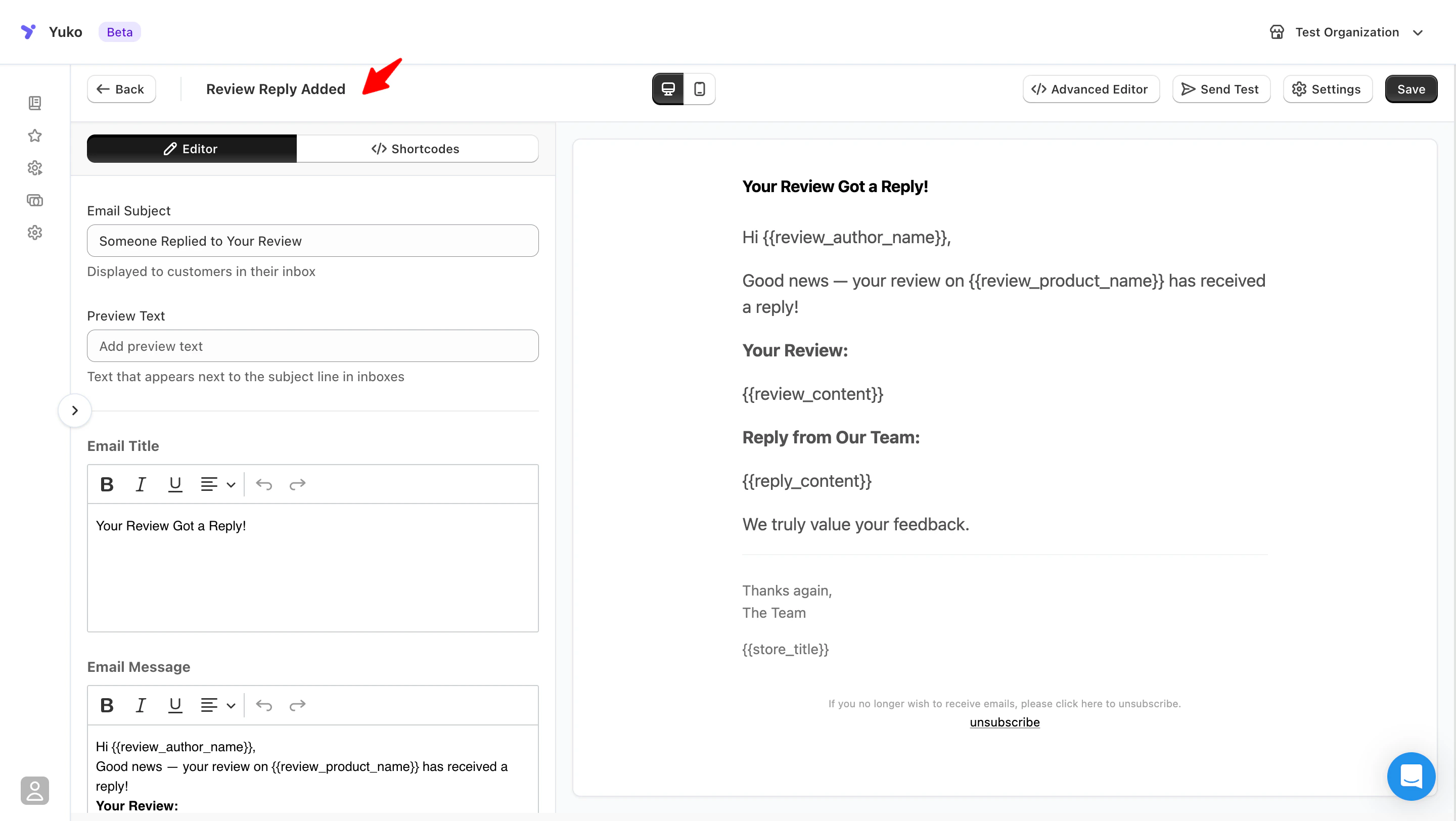
The Automatic Process
Customer Submits Review
Customer writes a review on your store (positive, neutral, or negative).Any rating: This email works for all reviews, regardless of star rating.
You Reply in Dashboard
You read the review and write a thoughtful reply in the Yuko Dashboard.Public reply: Your response appears on your store for everyone to see.
Yuko Detects Reply
Yuko automatically detects that you added a reply to a customer’s review.Smart tracking: Only sends email when reply is published (not saved as draft).
Email Sends to Reviewer
Customer receives email notification that you replied to their review.Timing: Instant or delayed (your choice - default is 1 day later).
Why This Matters
Most Reviewers Never Return
The problem with replies:
- Customer leaves review and moves on
- You reply publicly on your store
- But original reviewer never visits again
- They never see you acknowledged them
- Wasted opportunity to connect
Shows You Care
Builds emotional connection:
- “They actually read my review!”
- “They took time to respond personally”
- “My feedback matters to them”
- “This is a company that cares”
Turns Negatives into Positives
Handle complaints professionally:
- Acknowledge negative reviews
- Apologize and offer solution
- Customer receives notification
- Many update review or give second chance
Encourages Advocacy
Creates brand advocates:
- Customer sees you reply to everyone
- Impressed by responsiveness
- Tells friends about good experience
- Returns for future purchases
Email Settings
Timing: When to Send Notification
Timing: When to Send Notification
Setting: Days after to notify a reply**Navigation: **Yuko Dashboard → Reviews → Emails → Review Reply Added Email → Edit → Settings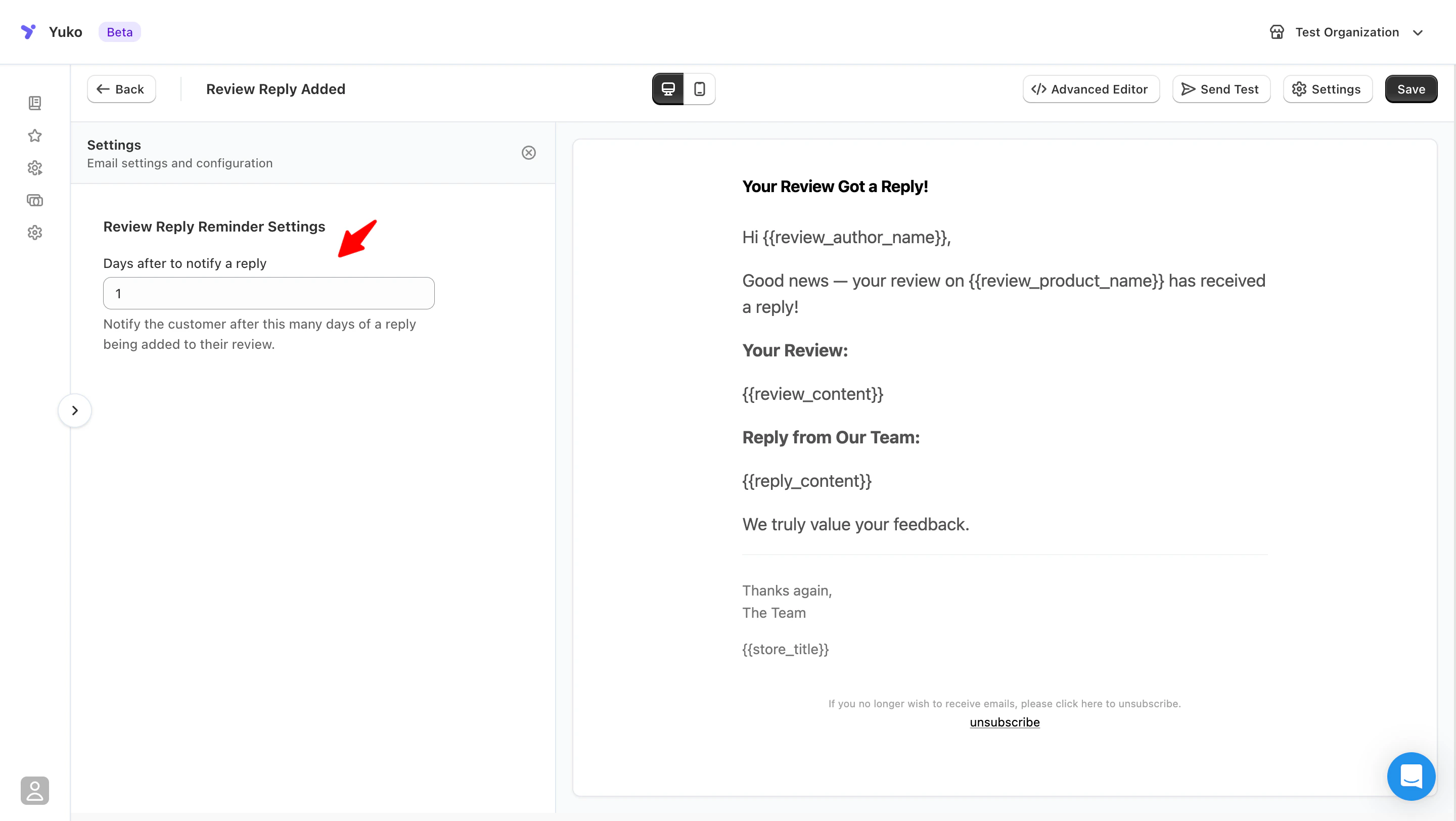
Best practice:
A short delay keeps the interaction human and thoughtful, rather than automated.
When to use this setting
| Delay | When to use | Why |
|---|---|---|
| 1 day (recommended) | Most stores | Timely notification without feeling intrusive |
| 2–3 days | High review volume stores | Avoids frequent notifications |
| 0 days | ❌ Not recommended | Can feel immediate and disruptive |
A short delay keeps the interaction human and thoughtful, rather than automated.
Subject Line: Make it Personal
Subject Line: Make it Personal
Setting: Email Subject
What this setting does
Defines the subject line shown in the customer’s inbox when a reply is added to their review.Best practices for reply notification subject lines
Subjects should feel personal and appreciative, not transactional.✅ Recommended examples
- _We replied to your review on _
- _Thanks for your feedback on _
- Your review has a new reply
- We’ve responded to your review
❌ Avoid
- Urgent or promotional language
- Discount-related wording
- Vague system messages (“Notification update”)
Personal touch: Using your actual name (“Sarah replied to your review”) feels more human than “[Store Name] replied.”
Preview Text
Preview Text
Email Title
Email Title
Message (Body)
Message (Body)
What makes a good reply notification email
- Acknowledges the customer’s original review
- Clearly shows the reply content
- Keeps the tone conversational
- No calls to action or promotions
Example message structure (shortcode-safe)
Optional review elements
You can also include:- – Display the rating
- – Show the product image
- – Link to the product page
What to avoid
- Promotional or sales language
- Asking for another review
- Urgent or automated-sounding messages
- Long explanations
Email Footer
Email Footer
Available Shortcodes
- Review Details
- Order Info
- Review Display
Information about their review:
{{review_rating}}- Star rating (1-5){{review_author_name}}- Customer’s name{{review_content}}- Their review text{{review_status}}- Review status (published, pending){{review_product_name}}- Product they reviewed{{review_product_url}}- Link to product page{{review_product_image}}- Product image URL
Best Practices for Replying to Reviews
Reply to EVERY Review
Reply to EVERY Review
Personalize Every Reply
Personalize Every Reply
Never use generic templates verbatimWhat to personalize:
- Use customer’s name
- Reference specific product
- Mention something from their review
- Acknowledge their specific concern or praise
- Shows you actually read their review
- Builds real connection
- Demonstrates authenticity
- Encourages repeat business
Save time with templates: Create reply templates for common scenarios (positive, negative, neutral), but ALWAYS customize with customer’s name and specific details from their review.
Handle Negative Reviews with Care
Handle Negative Reviews with Care
Your reply is public - others are watchingThe golden formula for negative reviews:What NOT to do:
- Thank them - “Thank you for bringing this to our attention”
- Apologize - “We’re sorry you had this experience”
- Take responsibility - Don’t make excuses or blame customer
- Offer solution - “We’d like to make this right…”
- Take offline if needed - “Please email us at…”
- ❌ Argue or defend yourself
- ❌ Blame the customer
- ❌ Ignore or delete the review
- ❌ Ask them to remove/change review in exchange for refund
- ❌ Be defensive or sarcastic
Reply Timing Strategy
Reply Timing Strategy
Common Questions
Do customers actually read reply notifications?
Do customers actually read reply notifications?
Yes, at much higher rates than other emailsOpen rates:
- Average promotional email: 15-20% open rate
- Review reply notification: 40-60% open rate
- Negative review replies: 60-80% open rate
- Personal to them (about THEIR review)
- Unexpected (most stores don’t reply)
- Curiosity (what did they say?)
- Investment (they already took time to review)
- 50-70% click through to view full reply on site
- 20-30% browse other products while there
- 10-15% make another purchase within 30 days
- Many update their review or leave more detailed feedback
High ROI activity: Replying to reviews (and notifying customers) has one of the highest customer retention ROIs - costs almost nothing, builds loyalty significantly.
Should I reply to positive reviews or just negatives?
Should I reply to positive reviews or just negatives?
BOTH - but with different approachesPositive reviews (4-5 stars):Why reply:
Negative reviews (1-3 stars):Why reply:
- Thank them publicly
- Reinforce positive behavior
- Show other customers you’re engaged
- Build loyalty for repeat purchases
- Brief thank you (2-3 sentences)
- Personalize with their name
- Reference specific product or detail
- Invite them back
Negative reviews (1-3 stars):Why reply:
- Damage control (show others you care)
- Opportunity to fix problem
- Prevent customer churn
- Demonstrate professionalism
- Longer, more detailed (4-6 sentences)
- Apologize sincerely
- Offer concrete solution
- Take conversation offline if complex
Should I include an incentive in my reply?
Should I include an incentive in my reply?
Depends on the review typeNegative reviews (1-3 stars):Yes, offer compensation:
Positive reviews (4-5 stars):Usually no - but can be strategic:Don’t offer incentive if:
- Shows you take responsibility
- Gives customer reason to try again
- Public gesture of goodwill
- Often results in review update
Positive reviews (4-5 stars):Usually no - but can be strategic:Don’t offer incentive if:
- Just saying thank you (no incentive needed)
- Standard positive review
- Already rewarded for photo review
- Exceptional review (detailed, photos, videos)
- Influential reviewer (large following)
- Want to encourage repeat purchase
- Customer went above and beyond
Next Steps
Enable Reply Notifications
Turn on automatic notifications when you reply to reviews.Time: 1 minute Location: Reviews → Emails → Review Reply Added Email
Set 1-Day Delay
Configure notification to send 1 day after you reply (batches multiple replies).Why 1 day: Efficient for you, still responsive for customer
Customize Message
Write warm, personal notification message.Time: 3 minutes Tone: Grateful and authentic, signed with real name
Create Reply Templates
Draft templates for common reply types (positive, negative, neutral).Remember: Always personalize templates with customer name and specific details
Need Help?
Book a Free Setup Call
Talk to our team for personalised setup help.Time: 30 minutes
Contact Support
Visit our support hub for help articles, live chat and ticket submission.
Browse the Guides
Documentation across loyalty, referrals, memberships and more.
Install Yuko
Add Yuko to your Shopify store from the Shopify App Store.
Pro tip: Replying to reviews (especially negative ones) publicly shows potential customers that you care about feedback and handle problems professionally. This builds more trust than having only 5-star reviews with no replies.