
Navigation
Yuko Dashboard → Settings → Reviews → General → Google & SEO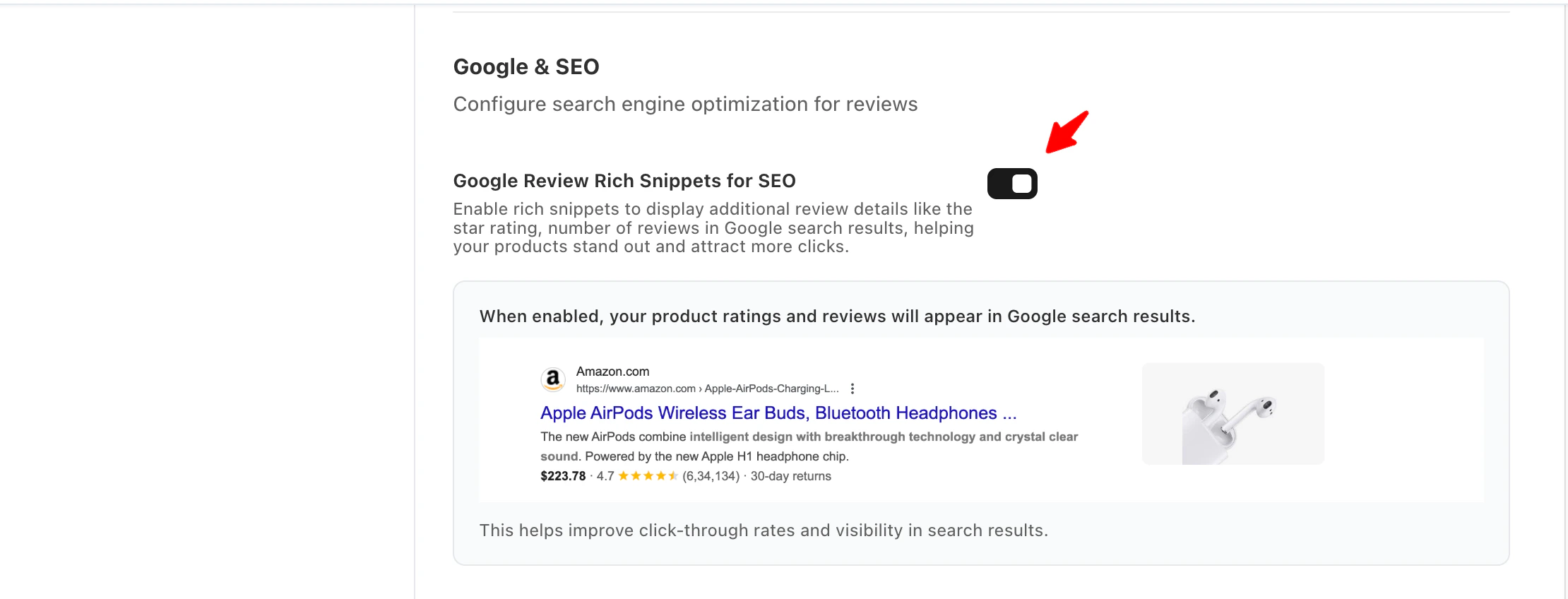
Overview
Display your product ratings and review counts directly on Google search results.Yuko automatically adds schema markup to your store pages, improving visibility and click-through rates.
How to Configure Google SEO for Reviews
Navigate to the Google SEO Settings
- Go to Settings → Reviews → General → Google & SEO
- Locate the Google & SEO section.
Enable Google Review Rich Snippets
- Find the Google Review Rich Snippets for SEO option.
- Toggle the switch ON to enable rich snippets.
- Once enabled, a preview image will appear, showing how your product ratings and reviews will display in Google search results.
What This Does
- Displays star ratings and number of reviews in Google search results.
- Helps customers quickly understand your product’s popularity and quality.
- Improves click-through rates by making your product listing more visually appealing and informative.
Benefits
- Star ratings visible in Google search results.
- Boosted SEO ranking potential.
- Higher CTRs and conversion rates from search.
This feature is available in Advanced and Growth Plans