
Get 50% More Reviews with One Gentle Reminder
Most customers who don’t respond to the first review request aren’t refusing - they’re just busy and forgot. A single friendly reminder sent 3-5 days later can increase your review collection rate by 50% (from 5-10% to 7-15%). What you’ll achieve:- Automatically remind non-responders without manual work
- Increase review collection by +50%
- Stay top-of-mind without being annoying
- Collect feedback from customers who needed a nudge
Impact: Adds +50% more reviews | Time to set up: 5 minutes
How It Works
Yuko Dashboard → Reviews → Emails → Review Reminder Email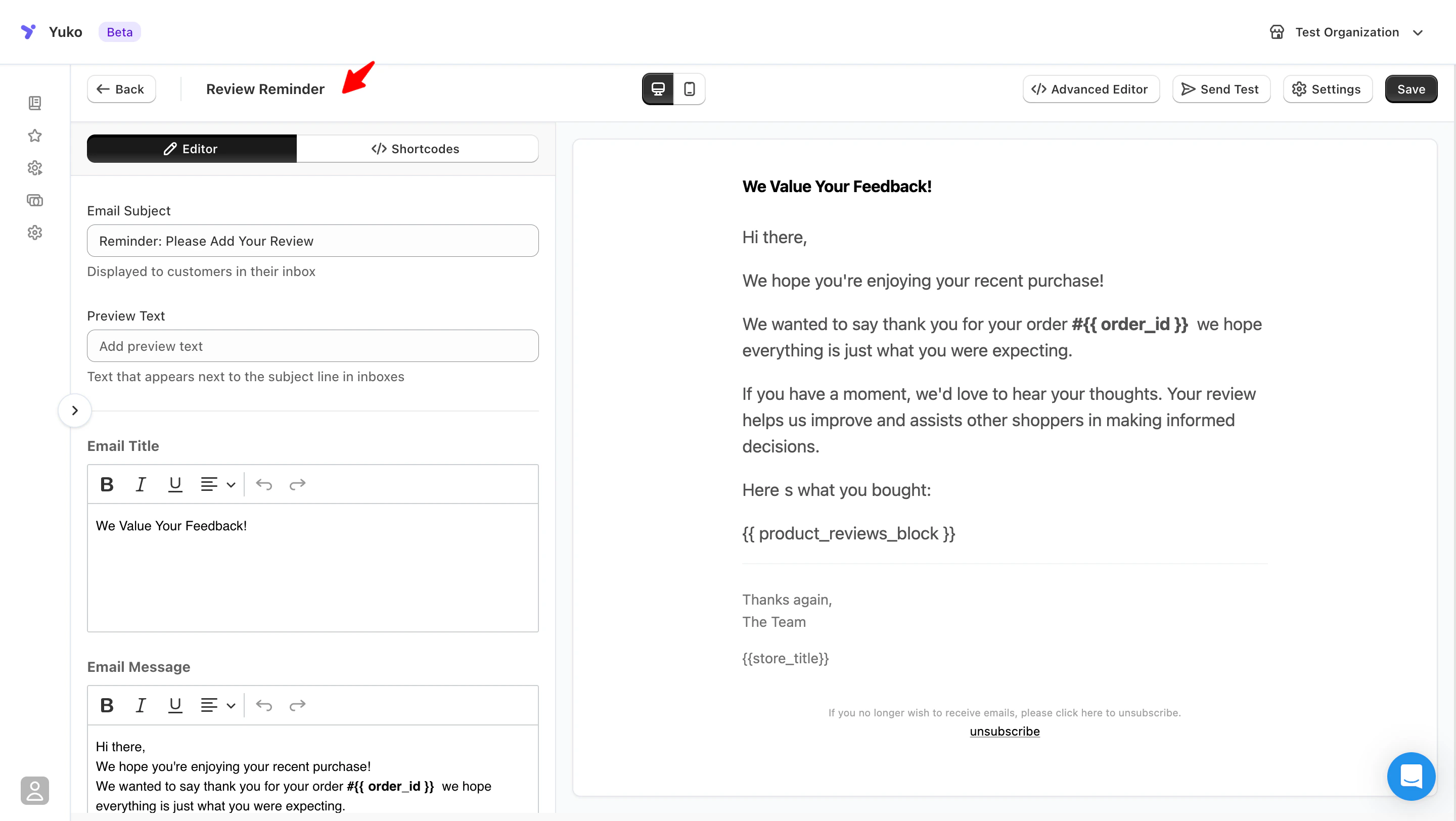
The Automatic Process
Review Request Sent
Customer receives initial review request 5 days after order delivery (or your set delay).
Yuko Tracks Response
Yuko automatically tracks whether customer clicked the review link or submitted a review.Yuko knows who responded - only non-responders get the reminder.
Reminder Waits
For customers who didn’t respond, Yuko waits your set delay (default: 5 days after first email).No duplicate emails - customers who already reviewed won’t get reminded.
Reminder Sends
Non-responders receive a gentle, friendly reminder with the same review link.One reminder only - Yuko won’t send multiple reminders (that would be spam).
Email Settings
Timing: When to Send Reminder
Timing: When to Send Reminder
Setting: Delay - Days after review request emailNavigation: Yuko Dashboard → Reviews → Emails → Review Reminder Email-> Edit-> Settings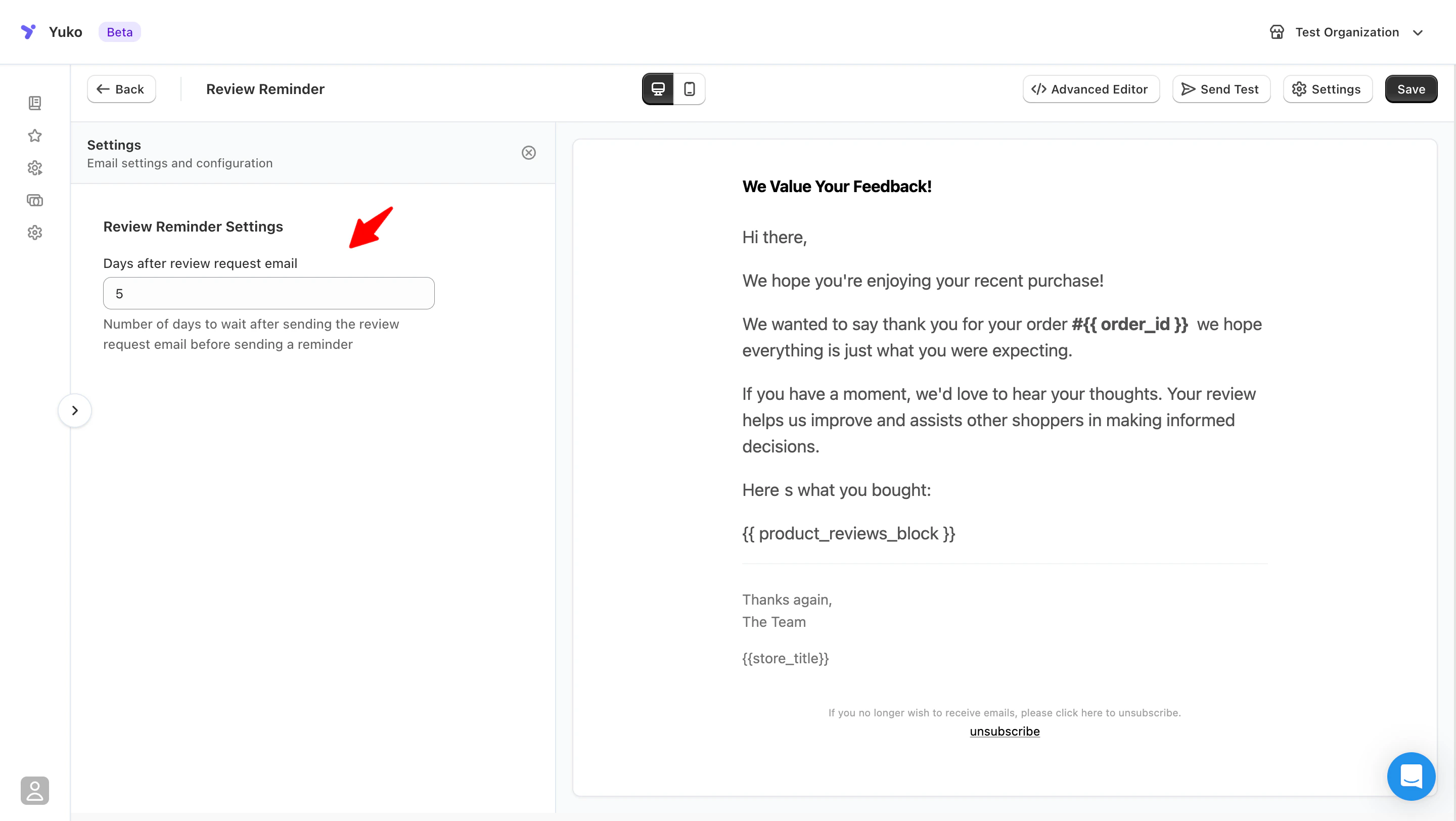
What it controls: Set the number of days YUKO should wait after the review request email is sent before sending a review reminder email.This reminder helps gently nudge customers who may have missed or forgotten the initial review request.Default: 5 daysHow to choose:
What it controls: Set the number of days YUKO should wait after the review request email is sent before sending a review reminder email.This reminder helps gently nudge customers who may have missed or forgotten the initial review request.Default: 5 daysHow to choose:
| Delay | When to Use | Why |
|---|---|---|
| 3 days | Fast-moving products (food, consumables) | Quick reminder while experience is fresh |
| 5 days (recommended) | Most products | Good balance - not too soon, not too late |
| 7 days | Considered purchases (electronics, furniture) | Give more time before following up |
| 10+ days | Don’t use | Too late - customer forgot about the product |
Subject Line: Keep it Friendly
Subject Line: Keep it Friendly
Setting: Email SubjectBest practices for reminder subject lines:✅ Good reminder subjects:
- Did you get a chance to review order_name?
- Quick reminder: share your thoughts?
- We’re still hoping to hear from you, customer_first_name
- One more thing about your order… ❌ Avoid:
- “FINAL REMINDER” (sounds threatening)
- “You forgot to review” (sounds accusatory)
- Same subject as first email (they’ll think it’s duplicate)
- “Last chance” or urgency tactics (not necessary)
- More casual/friendly tone
- Acknowledge it’s a follow-up
- No pressure or urgency
- Shorter and simpler
Make it different: Use a noticeably different subject than your first email so customers don’t think it’s a duplicate and delete it.
Preview Text
Preview Text
**What it means: **The short text shown next to the subject line in the inbox.Best practices
- Keep it short (1 line)
- Reinforce that this is a friendly follow-up
- Avoid urgency or guilt
- Just a quick follow-up — your feedback helps others
- If you have a minute, we’d love your thoughts
- A friendly reminder about your recent order
Email Title
Email Title
**What it means: **The headline shown at the top of the reminder email.Best practices
- Friendly and appreciative
- No urgency
- Reinforce value of feedback
- We Value Your Feedback
- Your Opinion Matters
- Thanks for Your Recent Order
Email Message
Email Message
What makes a good reminder emailWhat NOT to write
- Shorter than the first email (2–3 sentences)
- Acknowledge it’s a follow-up
- No guilt, pressure, or urgency
- One clear action (leave a review)
- ❌ “You haven’t reviewed yet”
- ❌ “This is your last chance”
- ❌ Repeating long explanations from the first email
- ❌ Desperate or pushy language
Email Footer
Email Footer
Unsubscribe Text & Description
Unsubscribe Text & Description
What it controls
The opt-out text shown at the bottom of the reminder email.Why this matters
The opt-out text shown at the bottom of the reminder email.Why this matters
- Required by law in most countries
- Shows respect for customers’ time
- Reduces spam complaints
- Protects your sender reputation
- Make unsubscribe links clear and visible
- Respect opt-outs immediately
- Avoid hiding or downplaying unsubscribe options
Best Practices
One Reminder Only
Don’t send multiple reminders
- One follow-up is friendly
- Two is annoying
- Three is spam
Keep it Light
Tone matters
- Friendly, not formal
- Casual, not corporate
- Helpful, not pushy
- Understanding, not demanding
Make it Easy
Remove friction
- Same review link as first email (pre-filled form)
- Big, obvious button
- Mobile-friendly
- One click to review
Test First
Always testSend test to yourself:
- Check it arrives in inbox (not spam)
- Tone sounds friendly, not pushy
- Link works
- Mobile looks good
Available Shortcodes
Same personalization tags as Review Request Email:- Customer Info
- Order Info
- Product Info
{{customer_name}}- Full name{{customer_first_name}}- First name (use this!){{customer_last_name}}- Last name{{customer_email}}- Email address
Next Steps
Enable Reminder Email
Turn on the reminder email in Yuko settings.Time: 1 minute Location: Reviews → Emails → Review Reminder Email
Set 5-Day Delay
Set reminder to send 5 days after first review request.Why 5 days: Sweet spot - not too soon, not too late
Write Friendly Message
Keep it shorter and more casual than first email.Time: 3 minutes Tone: Friendly nudge, not pushy demand
Send Test
Test the reminder to make sure tone feels right.Check: Not too pushy? Unsubscribe clear? Link works?
Need Help?
Pro tip: The reminder email is one of the highest-ROI features. It takes 5 minutes to set up and can increase your review collection by 50%. Don’t skip this one!