
Navigation
Yuko Dashboard → Settings → Reviews → General → Admin Notifications
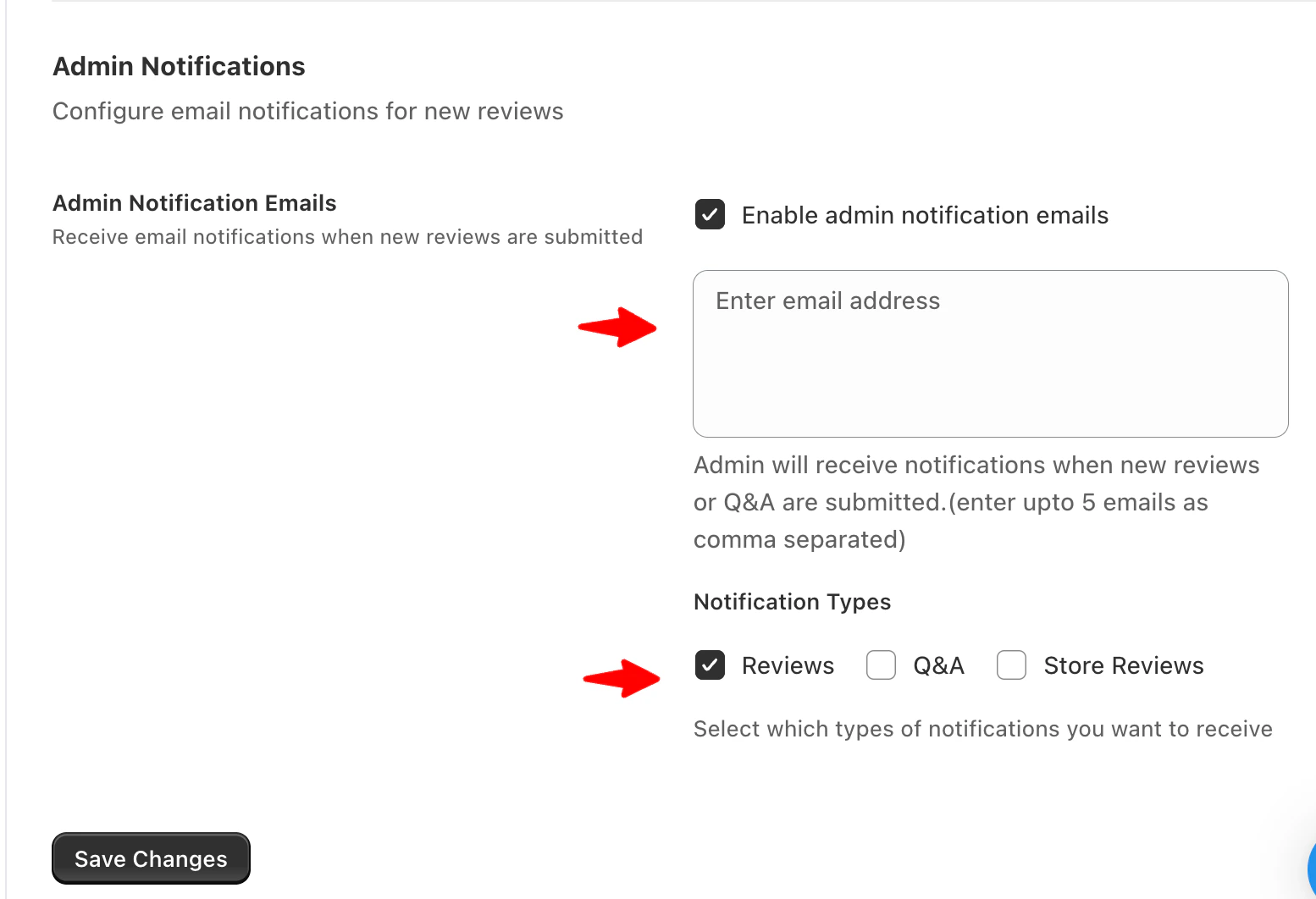
Enable Admin Notification Emails
You can choose to receive email notifications whenever customers submit new content.To Enable Admin Notifications
- Go to Settings → Reviews → General
- Scroll to the Admin Notifications section
- Enable Admin Notification Emails
Notification Email Addresses
Enter the email addresses that should receive admin notifications.- Add up to 5 email addresses
- Separate multiple emails with commas
- This field is required to enable notifications
admin@store.com, support@store.com
Make sure all email addresses entered are valid to ensure delivery.
Notification Types
Choose which types of notifications you want to receive. You can enable notifications for:- Product Reviews
- Store Reviews
- Questions & Answers (Q&A)
Save Your Settings
After configuring your preferences:- Review your email addresses and notification types
- Click Save changes
When to Use Admin Notifications
Admin notifications are useful if you want to:- Respond quickly to new reviews
- Moderate feedback in real time
- Stay informed about customer questions
- Monitor store reputation actively
How It Works
Once enabled, the listed admins will receive an email whenever:- A new review is submitted.
- A new Q&A entry is posted by a customer.