
Get More Customer Reviews with Automated Emails
Instead of manually asking for reviews, Yuko automatically sends review request emails to customers after the orders are fulfilled. This increases your review collection rate by 10x compared to hoping customers review on their own. What you’ll achieve:- Automatically ask every customer for a review
- Send reminders to customers who don’t respond
- Collect more photo reviews with rewards
- Build trust and increase sales with authentic feedback
Average results: Stores collect reviews from 5-10% of customers with basic requests, 15-25% with reminders and rewards
How Review Request Emails Work
Yuko Dashboard → Reviews → Emails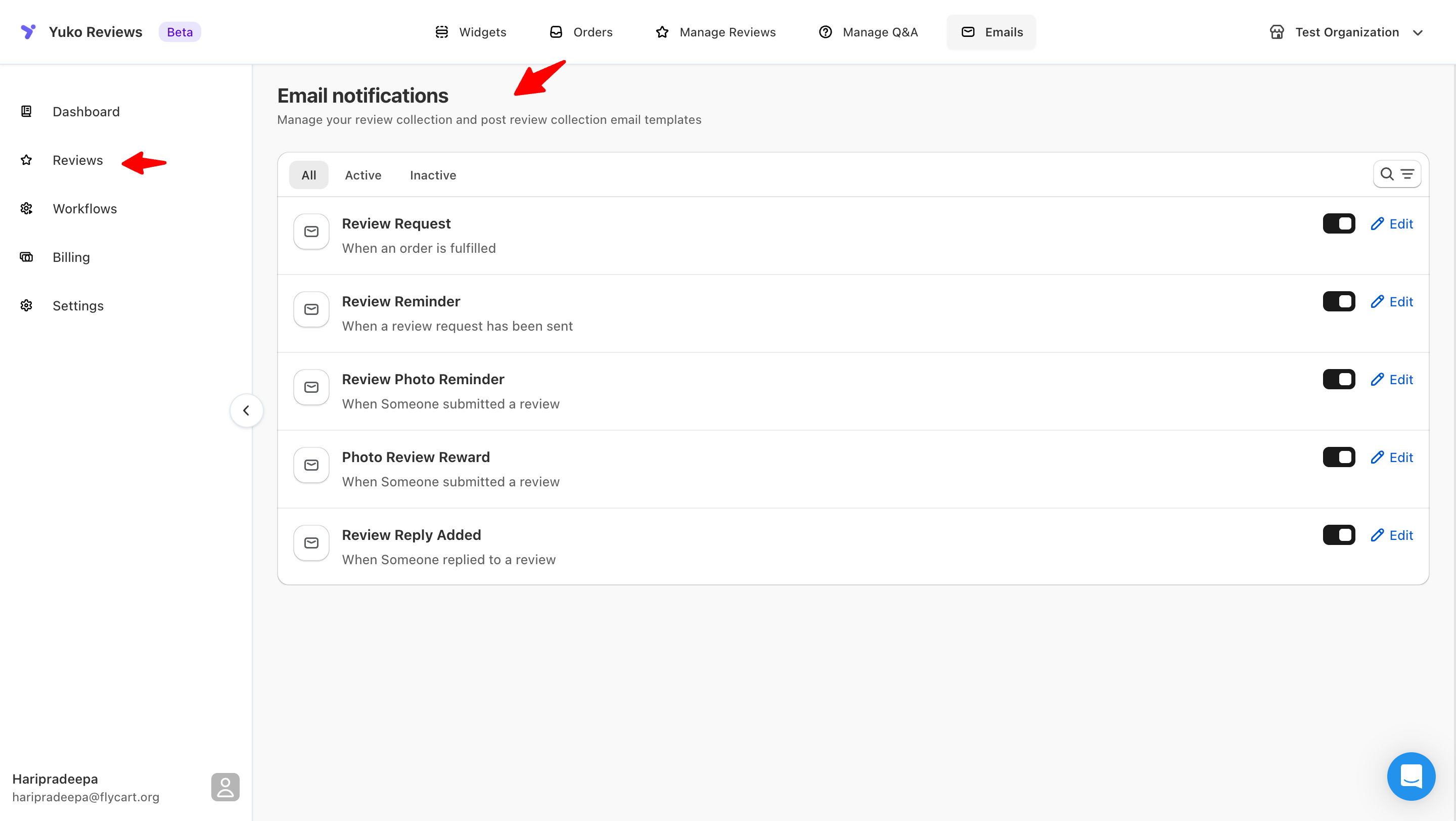
The Automatic Flow
Customer Receives Their Order
When you mark an order as “Completed” in WooCommerce, Yuko knows the customer received their purchase.Your action: Mark orders as Completed when they’re delivered (you probably already do this)
Yuko Waits for the Right Time
Yuko automatically waits your set number of days before sending the review request.
Review Request Email Sends
Customer receives a personalized email with a link to review their purchase.What’s included:
- Customer’s name (personalized greeting)
- Products they ordered
- One-click link to review form
- Optional discount reward for reviewing
Customer Writes Review (or Doesn't)
If customer writes a review, great! If they don’t respond, Yuko can send a reminder.Response rate: 5-10% of customers review after first email
Reminder Email Sends (Optional)
3-5 days later, customers who didn’t respond receive a gentle reminder.Additional response rate: +50% more reviews with reminder emails
Types of Review Emails
Choose which emails to enable based on your goals:Review Request Email (Essential)
Review Request Email (Essential)
Purpose: Ask customers to review their purchaseWhen it sends: X days after order is marked “Completed” (you choose the delay)Response rate: 5-10% of customers leave a reviewBest for: Every store - this is your main review collection email→ Set up Review Request Email
Review Reminder Email (Recommended)
Review Reminder Email (Recommended)
Purpose: Gentle reminder for customers who didn’t respond to first emailWhen it sends: 3-5 days after Review Request Email (only to non-responders)Response rate: Adds +50% more reviews (5-10% → 7-15%)Best for: Stores serious about collecting reviews→ Set up Review Reminder Email
Photo Review Reminder Email (Optional)
Photo Review Reminder Email (Optional)
Purpose: Ask customers who left text reviews to add photosWhen it sends: 3-7 days after customer submits review without photoPhoto upload rate: 15-25% of text reviewers add photos when remindedBest for: Fashion, beauty, home decor - products that benefit from visual reviews→ Set up Photo Reminder Email
Photo Review Reward Email (Recommended)
Photo Review Reward Email (Recommended)
Purpose: Thank customers who include photos and offer a rewardWhen it sends: Immediately after customer submits review with photoImpact: 2-3x more customers include photos when rewardedBest for: All stores - photos dramatically increase trust and conversionsTypical reward: 10% off next order or $5 coupon→ Set up Photo Reward Email
Review Reply Added Email (Optional)
Review Reply Added Email (Optional)
Purpose: Notify customers when you reply to their reviewWhen it sends: After you reply to a customer’s review in the dashboardImpact: Builds relationships, shows you care about feedbackBest for: Stores that actively reply to reviews (especially negative ones)→ Set up Review Reply Email
Recommended Email Strategy
Different strategies work for different store sizes and goals:- Getting Started
- Growing Store
- Maximizing Reviews
Best for: New stores, just starting with reviewsEnable these emails:
- ✅ Review Request Email (7 days after delivery)
- ❌ Review Reminder (wait until you have 20+ reviews first)
- ❌ Photo emails (add later when you have steady review flow)
- 5-10% of customers leave reviews
- 10-20 reviews per month (if you get 200 orders/month)
- Simple setup, easy to manage
Common Questions
How many emails should I send?
How many emails should I send?
Recommended approach:Minimum (every store should do this):
- Review Request Email
- Review Request Email
- Review Reminder Email (one reminder only)
- Review Request
- Review Reminder (once)
- Photo Reminder or Reward (one of these, not both)
What's a good response rate?
What's a good response rate?
Industry benchmarks:
- No review requests: less than 1% of customers review on their own
- Basic review request: 5-10% response rate
- Request + reminder: 10-15% response rate
- Request + reminder + incentive: 15-25% response rate
- Product quality (better products = more reviews)
- Customer satisfaction (happy customers review more)
- Email timing (right timing = higher response)
- Incentive amount (bigger reward = more responses)
Don’t worry if your rate is lower than 10% - this is still 10x better than not asking at all!
Should I offer rewards for reviews?
Should I offer rewards for reviews?
Pros of offering rewards:
- 2-3x higher response rate
- More detailed reviews (customers put in effort)
- Faster review collection
- Customers appreciate the gesture
- Costs you money (discount or credit)
- May attract reviews only from deal-seekers
- Some platforms prohibit incentivized reviews
- Offer small reward for photo reviews only (10% off)
- Don’t offer reward for just any review
- Make sure reward doesn’t influence rating (don’t say “leave 5 stars for discount”)
When should I send review requests?
When should I send review requests?
General rule: Wait until customer has used the productProduct-specific timing:
Pro tip: You can set different delays for different products using Advanced Workflows
| Product Type | Recommended Delay | Why |
|---|---|---|
| Clothing/Fashion | 5-7 days | Time to wear and wash |
| Electronics | 10-14 days | Time to unbox and use |
| Supplements/Health | 21-30 days | Time to see results |
| Books/Digital | 3-5 days | Quick consumption |
| Home Goods | 7-10 days | Time to set up and use |
| Food/Perishables | 3-5 days | Quick consumption |
| Cosmetics | 7-14 days | Time to test product |
| Furniture | 10-14 days | Time to assemble and use |
What if customers ignore my review requests?
What if customers ignore my review requests?
Don’t take it personally - most customers don’t respond to review requests.Why customers don’t review:
- Too busy (most common reason - 70%)
- Forgot about the email (15%)
- Don’t know what to say (10%)
- Had neutral experience (not good or bad enough to review) (5%)
- Better timing: Send when experience is fresh
- Make it easy: One-click to review form, pre-fill details
- Add incentive: Small reward for their time
- Send reminder: One gentle follow-up (don’t spam)
- Perfect the email: Test different subject lines and messages
Can I customize the email design?
Can I customize the email design?
Yes! You can customize:
- Email subject line - Write in your brand voice
- Message content - Add your personal touch
- Colors and fonts - Match your brand (in Branding settings)
- Logo - Add your store logo to header
- Footer - Include your contact info, social links
- Buttons - Customize call-to-action text and colors
{{customer_first_name}}- Customer’s first name{{order_name}}- Order number{{product_name}}- Product they ordered
Next Steps: Set Up Your Review Emails
Start with Basic Review Request
Set up the main review request email that asks customers to review after delivery.Time: 10 minutes Impact: Start collecting reviews immediately→ Set up Review Request Email
Add a Reminder Email
Send one gentle reminder to customers who didn’t respond to the first email.Time: 5 minutes Impact: +50% more reviews→ Set up Review Reminder
Reward Photo Reviews
Offer a small discount to customers who include photos with their reviews.Time: 10 minutes Impact: 2-3x more photo reviews→ Set up Photo Rewards
Customize Your Branding
Add your logo and brand colors to make emails look professional.Time: 5 minutes Impact: Higher trust, better brand recognition→ Customize Email Branding
Need Help?
Book a Free Setup Call
Talk to our team for personalised setup help.Time: 30 minutes
Contact Support
Visit our support hub for help articles, live chat and ticket submission.
Browse the Guides
Documentation across loyalty, referrals, memberships and more.
Install Yuko
Add Yuko to your Shopify store from the Shopify App Store.
Pro tip: Start simple with just the Review Request Email. Once you’re getting reviews consistently, add the Reminder Email and Photo Rewards for better results.