
Migrate from Judge.me to Yuko Seamlessly
Switching from Judge.me to Yuko? Import all your existing reviews, photos, videos, and customer data in minutes. Our Judge.me import preserves your hard-earned social proof while giving you access to Yuko’s advanced features and better pricing. What you’ll achieve:- Import all Judge.me reviews automatically
- Preserve review photos and videos
- Maintain verified purchase badges
- Keep all star ratings and review dates
- Transfer customer testimonials intact
Impact: Judge.me import typically takes 10-60 minutes depending on review count and media files. All reviews, photos, and videos transfer automatically.
Why Migrate from Judge.me to Yuko
Better Features
More capabilities, better UX
- Advanced review workflows
- Better widgets and customization
- Q&A functionality
- Review moderation tools
- Improved analytics
Better Pricing
Save money, get more
- More affordable plans
- Better value for features
- No hidden fees
- Scales with your business
Complete Data Migration
Everything transfers
- All reviews (text, ratings)
- Photos and videos
- Verified purchase badges
- Review dates preserved
- Customer information
Easy Setup
Quick migration process
- CSV export from Judge.me
- Upload to Yuko
- Automatic product matching
- Reviews live in under an hour
Step-by-Step Import Instructions
Yuko Dashboard → Reviews → Manage Reviews → Import from Judge.meStep 1: Export Reviews from Judge.me
Step 1: Export Reviews from Judge.me
Download all your review data from Judge.meNavigation in Judge.me:
- Log in to your Judge.me account
- Click Settings in left sidebar
- Scroll to Export Reviews section
- Click Export to CSV
- ✅ All reviews (approved + pending)
- ✅ Review photos and videos
- ✅ Verified purchase status
- ✅ Review dates
- ✅ Reviewer information
- ✅ Product mappings (SKU or ID)
- All time (recommended)
- Or specific date range if you only want recent reviews
- Judge.me generates CSV file
- Download to your computer
- File typically named:
judgeme-reviews-export.csv - Size depends on review count (1KB - 50MB)
Step 2: Prepare CSV for Yuko Import
Step 2: Prepare CSV for Yuko Import
Format Judge.me export for Yuko compatibilityOpen CSV file:
- Use Excel, Google Sheets, or text editor
- Review column headers
- Check data formatting
product_idorproduct_sku- Product identifierrating- Star rating (1-5)review_text- Review contentreviewer_name- Customer namedate- Review submission date (YYYY-MM-DD)
email- For verified purchase matchingtitle- Review headlineverified- true/falsephoto_urls- Comma-separated photo URLsvideo_url- Video URL
- Judge.me exports:
12/15/2023or2023-12-15T10:30:00 - Yuko needs:
2023-12-15 - Fix: Use Excel date formatting or find/replace
- Judge.me SKU might not match your current store
- Verify SKUs match Yuko product database
- Update CSV if needed before import
- Ensure photo URLs start with
http://orhttps:// - Multiple photos: Separate with pipe
|character - Example:
https://cdn.judgeme.com/photo1.jpg|https://cdn.judgeme.com/photo2.jpg
- Ensure CSV is UTF-8 encoded
- Handles international characters, emojis
- Save as “CSV UTF-8” in Excel
- Yuko provides Judge.me import template
- Shows exact column names needed
- Includes sample data
- Available in import wizard
Best practice: Don’t edit review content. Only fix formatting (dates, URLs). Keep reviews exactly as customers wrote them for authenticity.
Step 3: Upload CSV to Yuko
Step 3: Upload CSV to Yuko
Import your prepared CSV fileIn Yuko Dashboard:
-
Go to Reviews → Manage Reviews → Import Reviews → Import from Judge.me
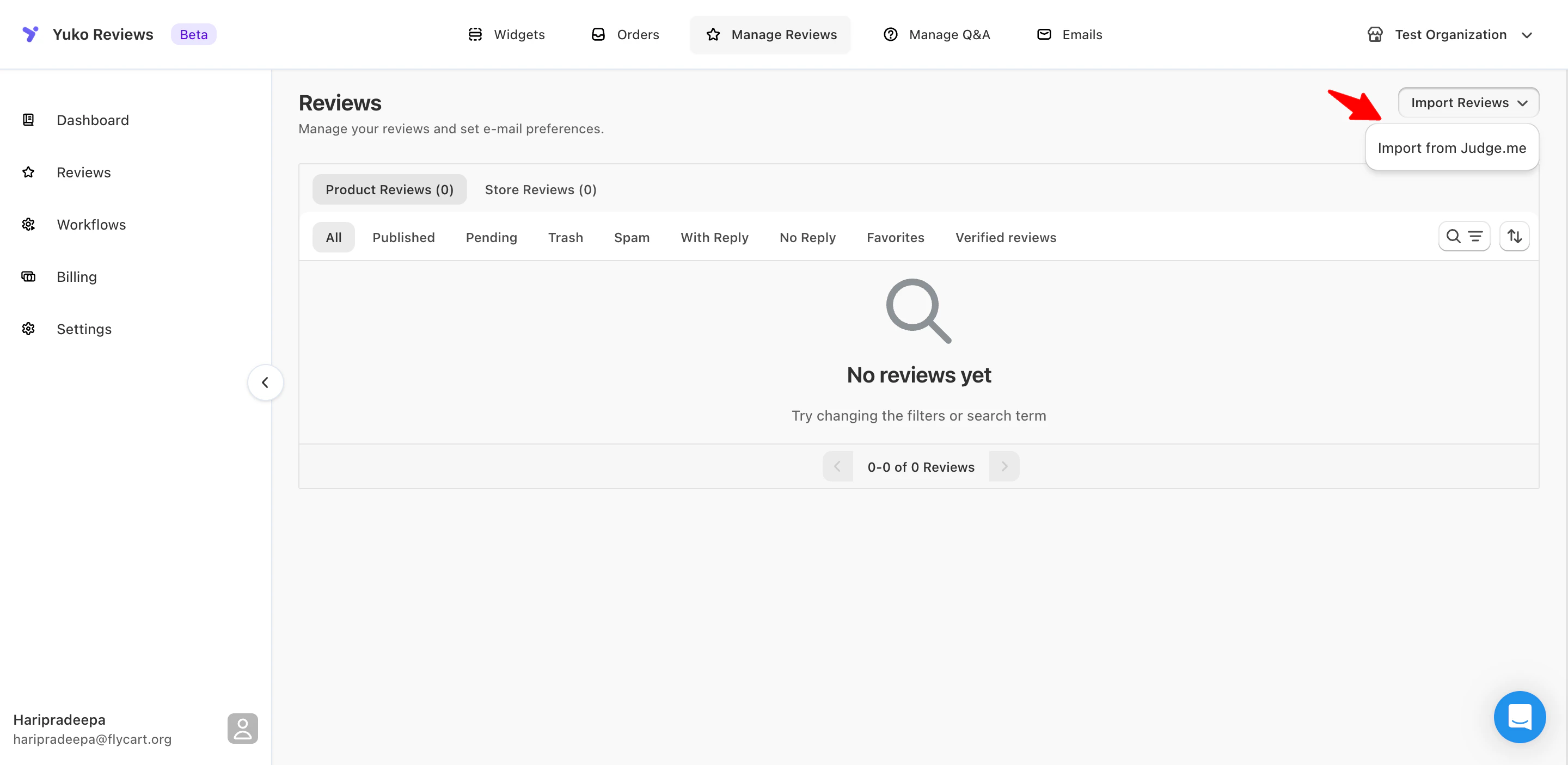
- Select “Import from Judge.me”
-
Click “Upload CSV File”
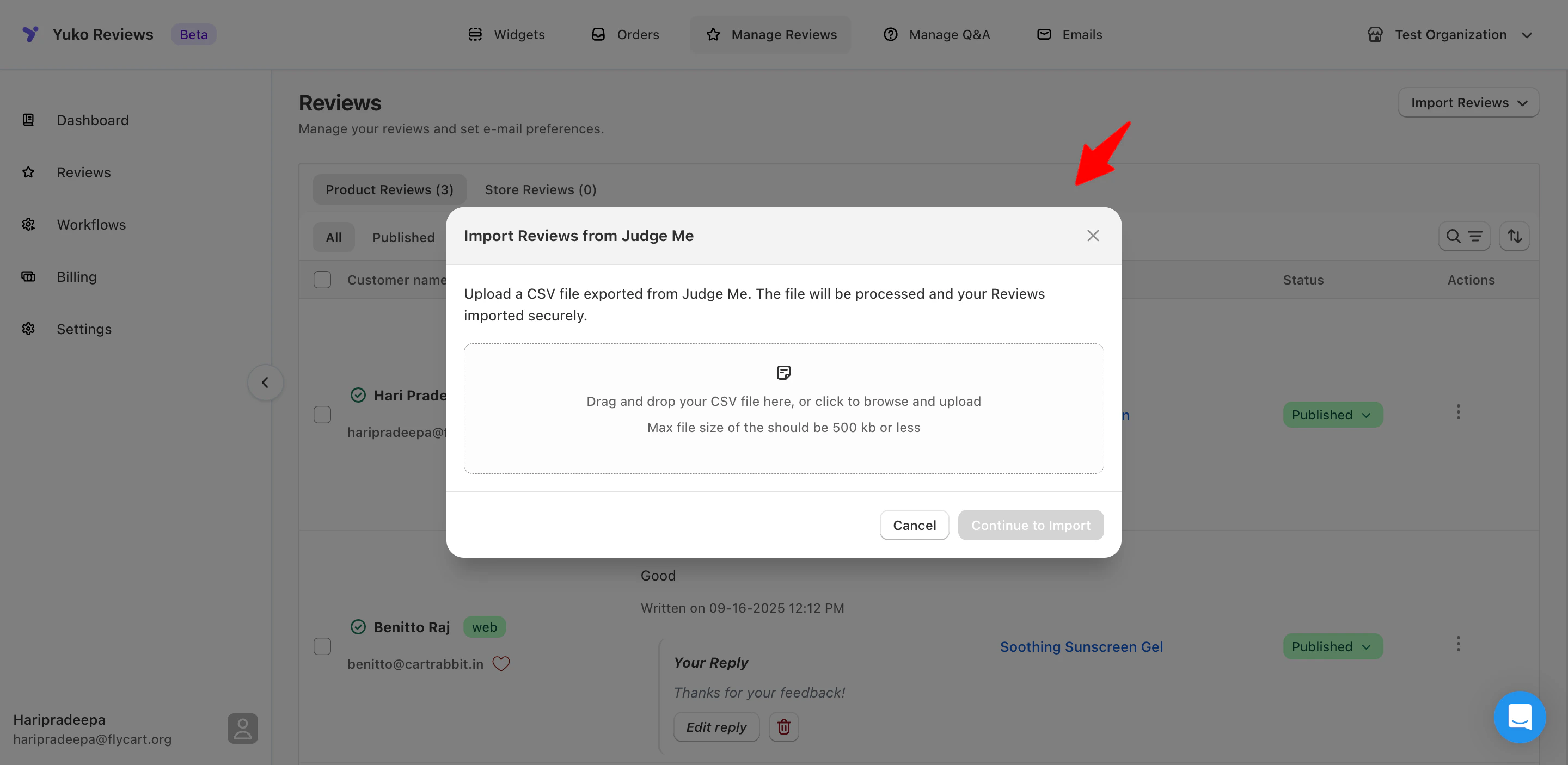
-
Choose your prepared CSV file
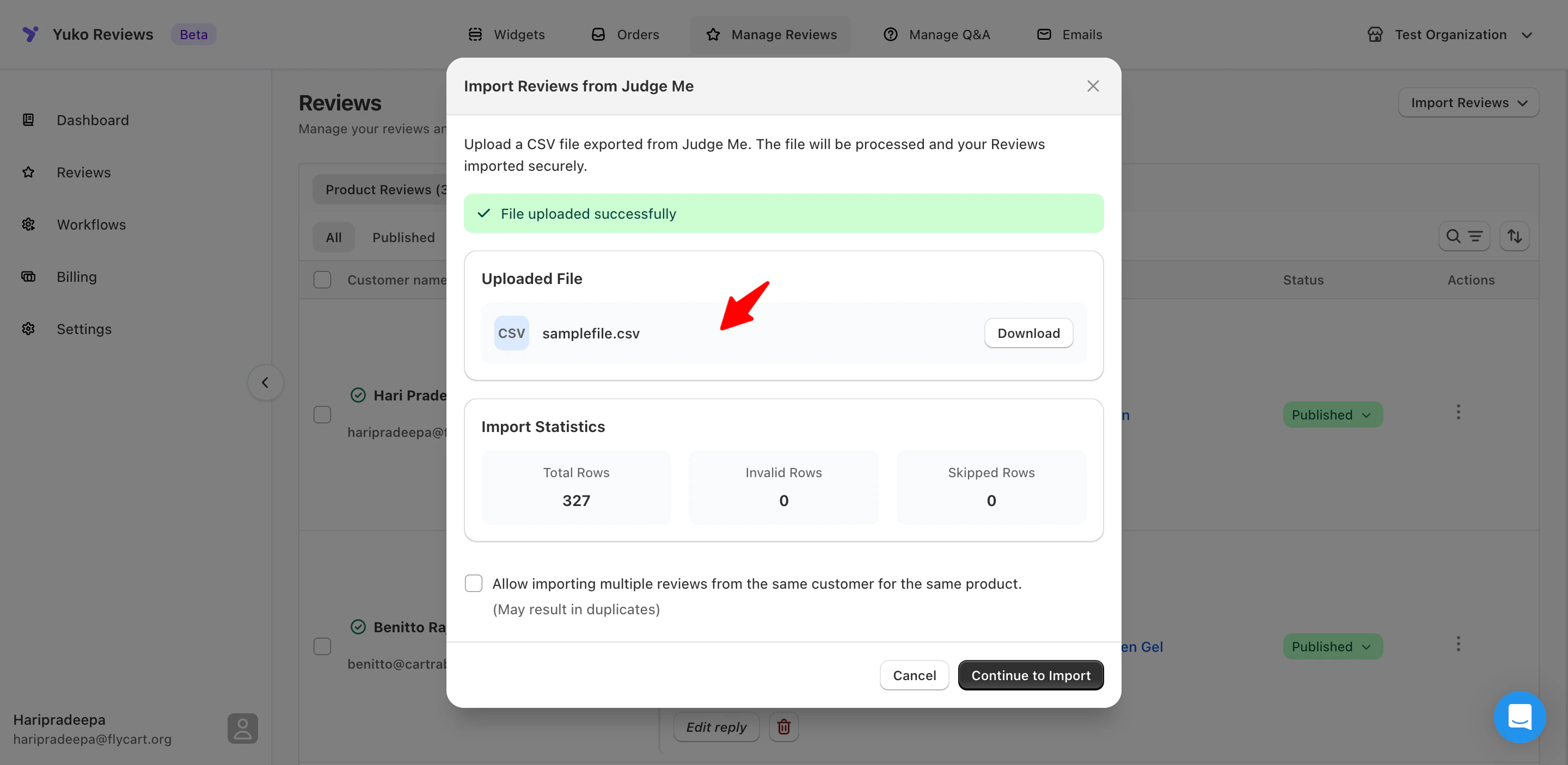
-
Click Continue to Import and confirm import
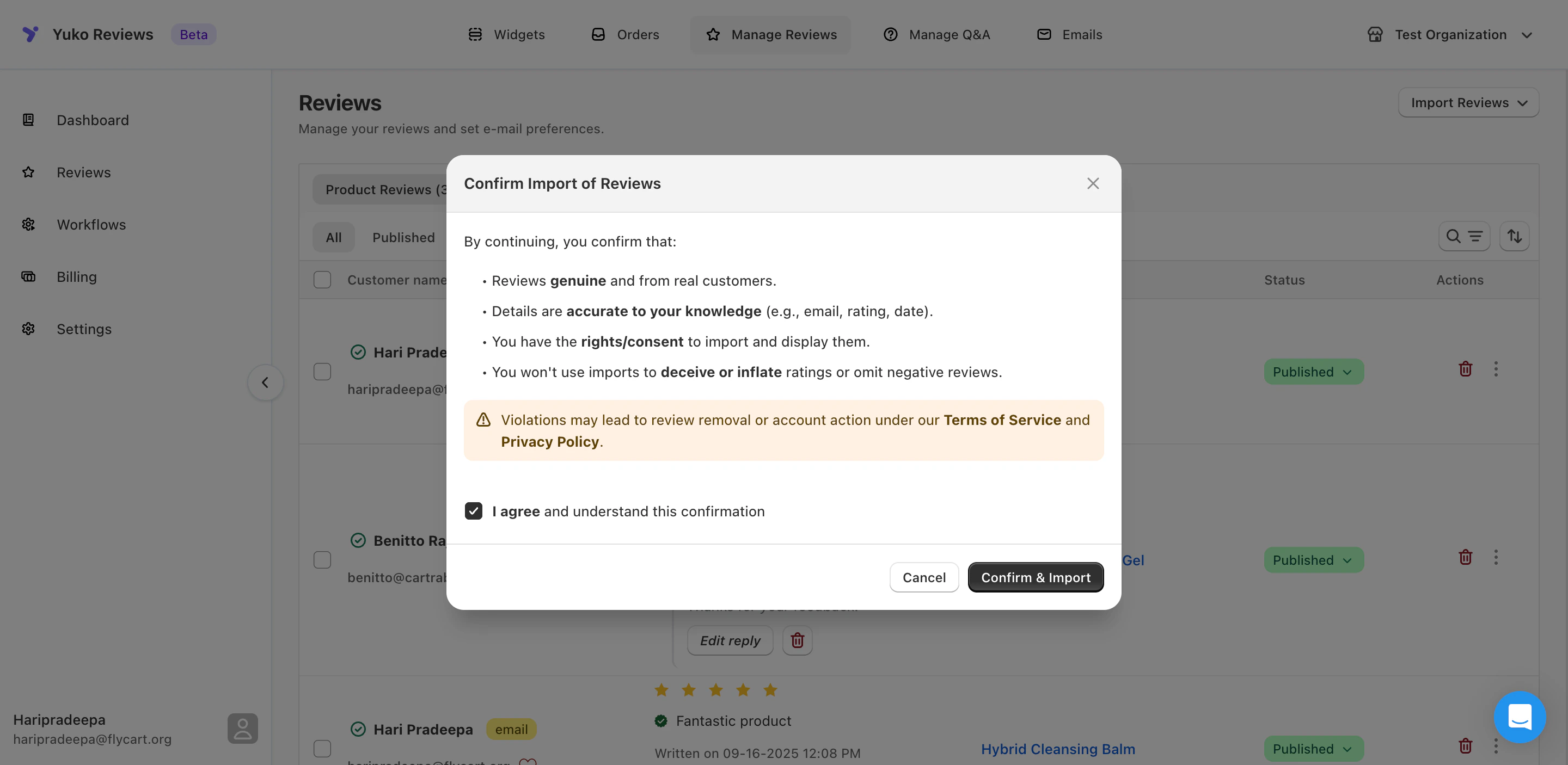
- Wait for upload to complete
- Import will be successful
What Gets Imported from Judge.me
After Import: Next Steps
Set Up Review Display Widgets
Install Yuko widgets to show reviews on your store.Required steps:
- Yuko Dashboard → Widgets
- Install Product Review Widget
- Install Star Rating Widget
- Configure widget settings
- Verify reviews displaying on product pages
Disable Judge.me (After Verification)
Remove Judge.me once Yuko is working.Before disabling:
- ✅ All reviews verified in Yuko
- ✅ Photos displaying correctly
- ✅ Widgets installed and working
- ✅ Test for 1-2 weeks minimum
- Uninstall Judge.me app from store
- Remove Judge.me widgets from theme
- Cancel Judge.me subscription
- Keep export file as backup
Need Help?
Book a Free Setup Call
Talk to our team for personalised setup help.Time: 30 minutes
Contact Support
Visit our support hub for help articles, live chat and ticket submission.
Browse the Guides
Documentation across loyalty, referrals, memberships and more.
Install Yuko
Add Yuko to your Shopify store from the Shopify App Store.
Pro tip: Keep your Judge.me CSV export file permanently as a backup. Even after successful import to Yuko, this file is your insurance policy and historical record of all customer reviews.