
It shows customer feedback, star ratings, photos, videos, and all review details in one clean place. Most stores place this widget below the product description so shoppers can read reviews before they buy. You can customize the layout, style, colors, and what information you want to show — all with live preview inside Yuko.
Navigation
Yuko Dashboard → Reviews → Widgets → Product Reviews Display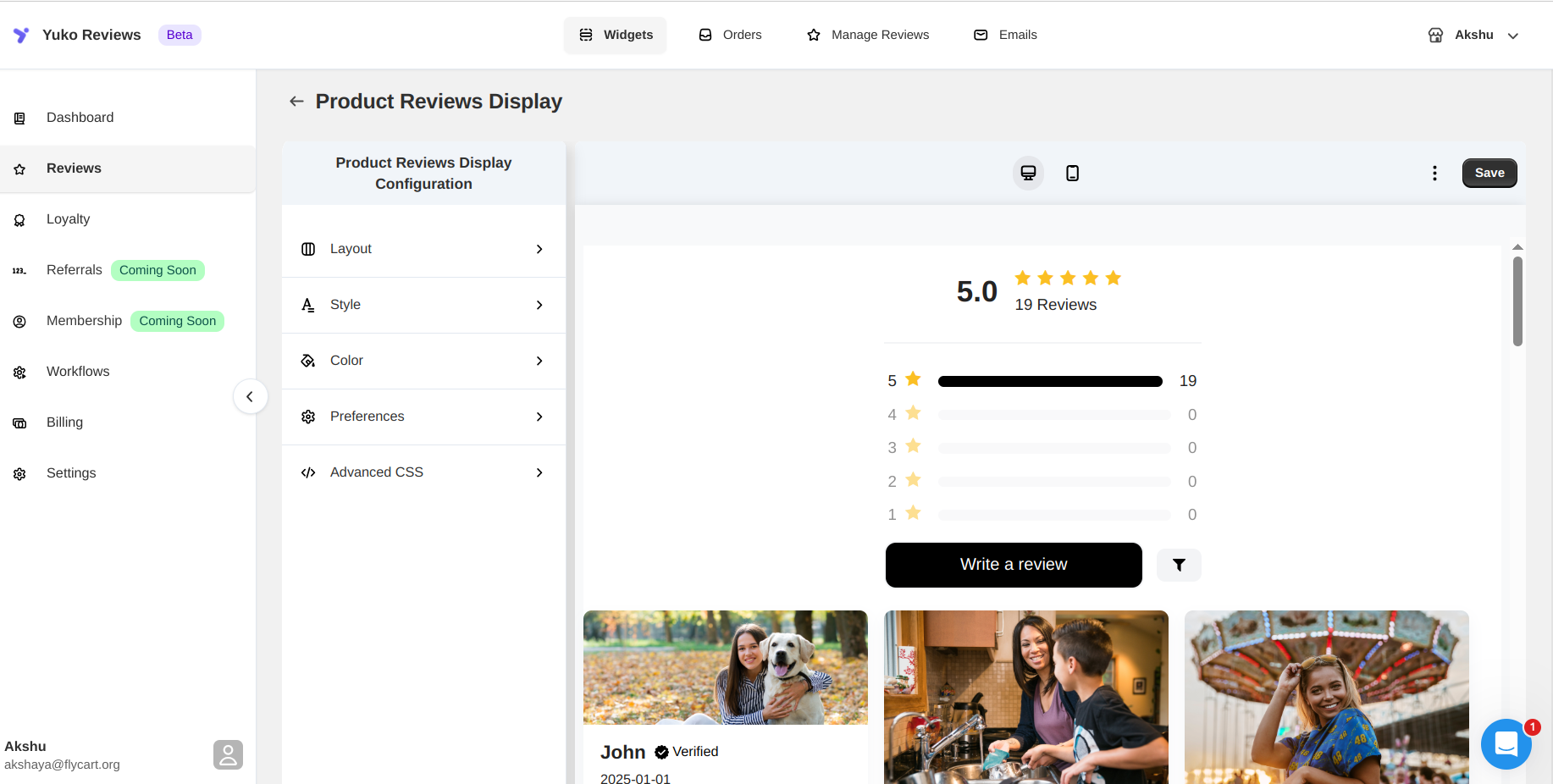
Customize the Product Reviews Display Widget:
The following are the options for customisation:
Layout
Choose how reviews and ratings are displayed:- Review Layout: Grid, List, or Mosaic
- Rating Layout: Horizontal or Compact
Style
Control the appearance of review cards:- Card Shadow: Classic, Light, Dark, or None
- Card Corners: Sharp to Extra Rounded
Colors
Match the widget with your brand by customizing:- Header text and rating bars
- Star icons
- Buttons (text, background, hover, border)
- Review cards, replies, badges, and arrows
Preferences
Decide what to show and how reviews behave:- Toggle review details (title, date, verified badge, replies, filters, sorting)
- Choose how reviews display when a product has no reviews
- Customize header text, buttons, and labels
- Set pagination and default sorting
Store Reviews
If enabled, you can:- Show or hide store reviews
- Customize store review labels and buttons