
Build Trust with Overall Shopping Experience Reviews
Shop reviews (also called Site Reviews or Store Reviews) let customers rate their entire shopping experience — not just individual products. These testimonials showcase your customer service, shipping speed, checkout experience, and overall brand quality. What you’ll achieve:- Collect testimonials about overall shopping experience
- Showcase service quality and reliability
- Build trust with first-time visitors
- Highlight shipping, support, and brand values
- Display store-wide social proof on homepage
Impact: Stores with shop reviews see 15-25% higher trust scores and convert 12% more first-time visitors
Store Reviews vs Product Reviews
Understanding the difference helps you collect the right feedback at the right time:Product Reviews
About specific items purchased
- Rating for individual products
- Focus on product quality, fit, features
- “This shirt fits perfectly”
- Appear on product pages
- Best asked 7-10 days after delivery
Store Reviews
About overall store experience
- Rating for entire shopping journey
- Focus on service, shipping, checkout
- “Great customer service and fast shipping”
- Appear on homepage/testimonial sections
- Best asked after multiple purchases
How to Set Up Store Review Collection
Navigation: Yuko Dashboard → Reviews → Widgets → Review Collection Form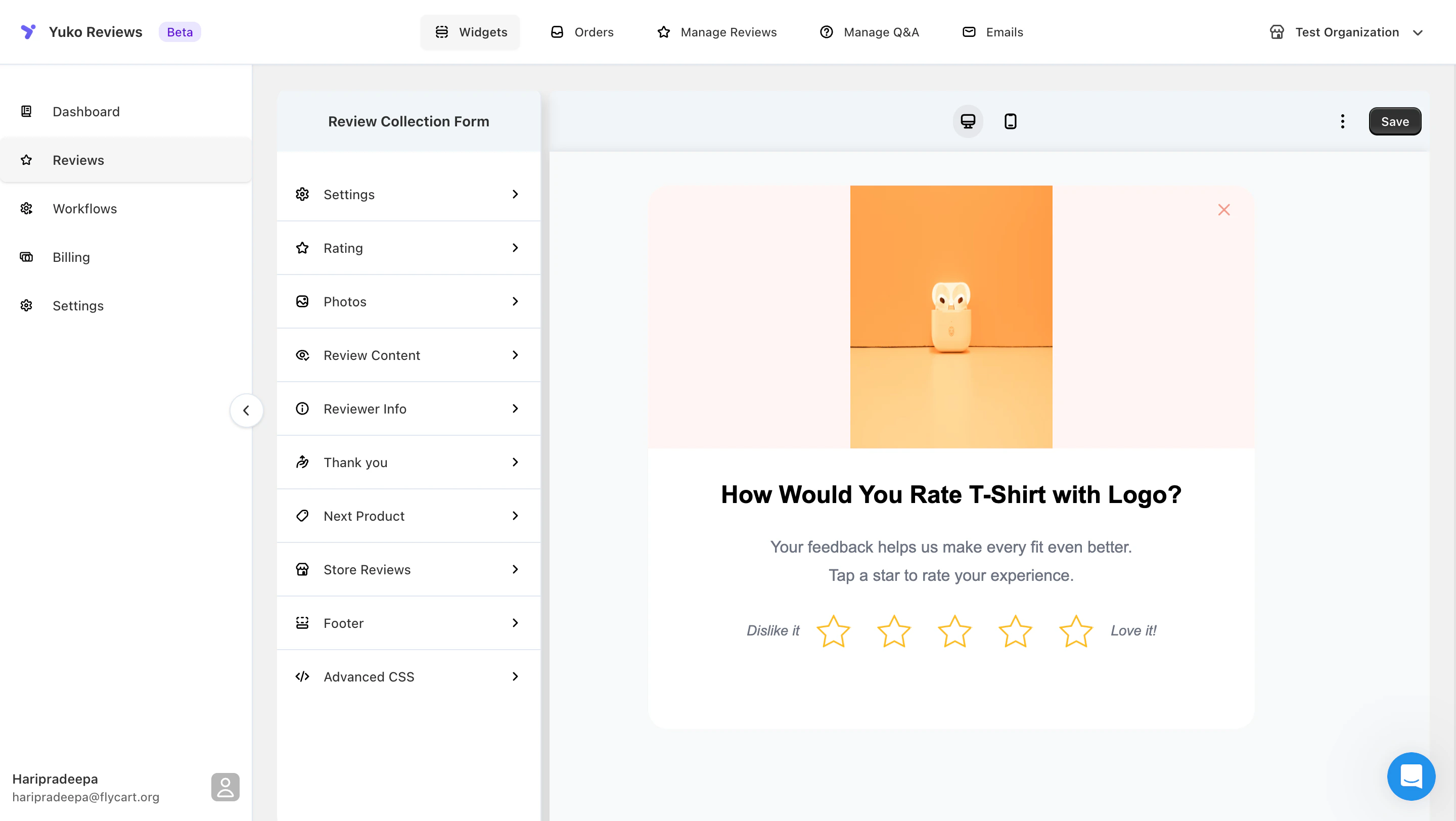
Enable Store Reviews
Navigate to the Review Collection Form settings and enable Store Reviews as a collection option.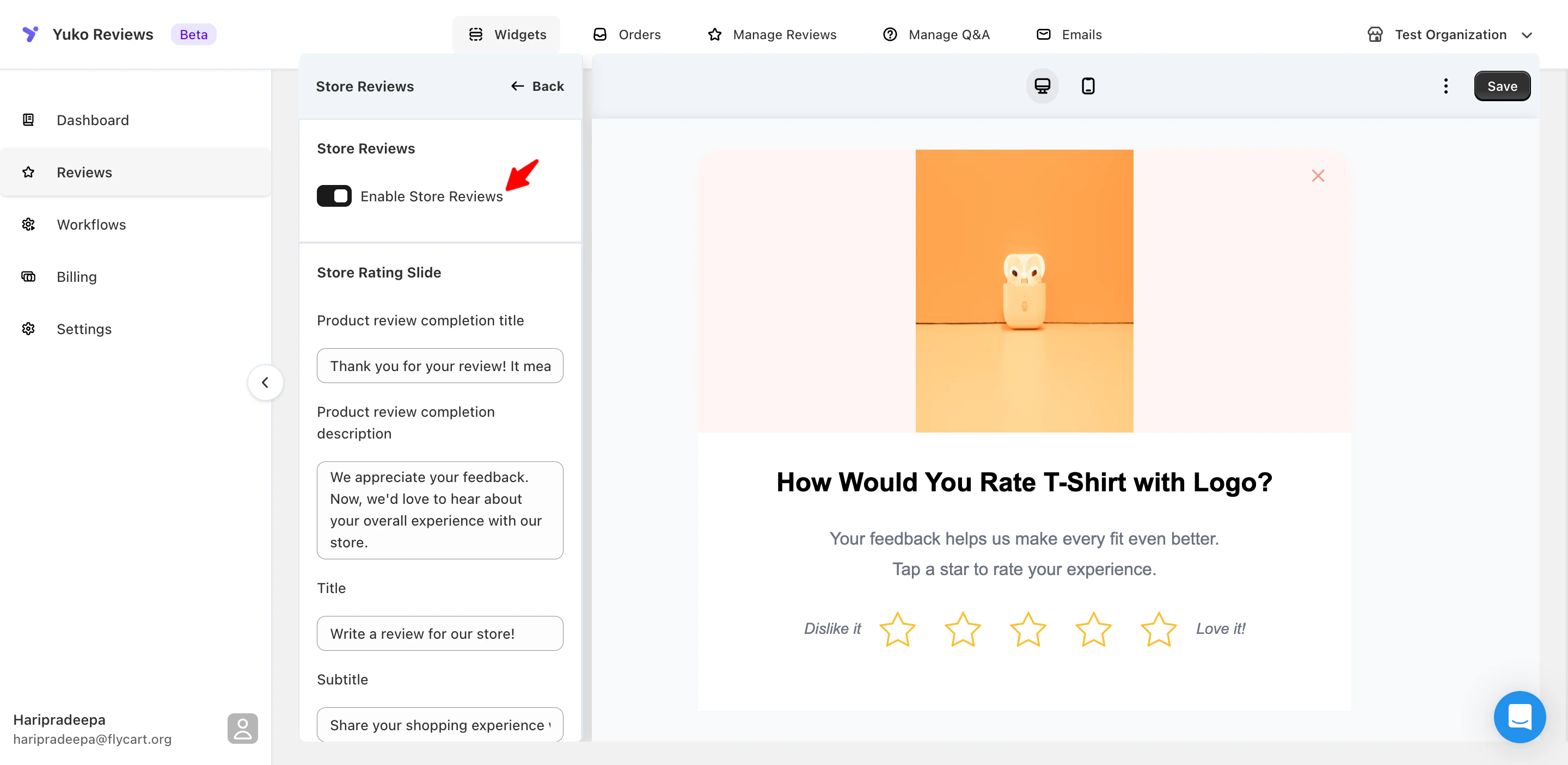
This feature is available in Growth Plan
- Adds “Write a review for our store” option to your site
- Creates dedicated shop review submission form
- Allows customers to review overall experience
- Separate from product review forms
Customize Store Review Form
You can customise the text shown at each step of the store review flow. All options below come with default text, which you can edit to match your brand voice.
- Store Rating Slide Customise the message shown after a customer completes a product review and is prompted to leave a store review. You can edit the completion title and description.
- Store Review Introduction Change the title and subtitle shown at the start of the store review form to better reflect your store’s tone.
- Photos Slide (Optional) Enable or disable photo uploads for store reviews. When enabled, you can customise the title, description, upload button text, and image upload helper text.
- Review Content Edit the title, subtitle, and placeholder text for the main review input to guide customers on what feedback to share.
- Review Title & Anonymous Option Customise the review title placeholder and the anonymous review label shown to customers.
Need Help?
Book a Free Setup Call
Talk to our team for personalised setup help.Time: 30 minutes
Contact Support
Visit our support hub for help articles, live chat and ticket submission.
Browse the Guides
Documentation across loyalty, referrals, memberships and more.
Install Yuko
Add Yuko to your Shopify store from the Shopify App Store.
Pro tip: Don’t try to collect shop reviews from everyone. Focus on customers who have ordered 2-3 times or had exceptional service interactions. These customers know your brand well enough to give meaningful testimonials.