
Navigation
Yuko Dashboard → Reviews → Widgets → Q&A Collection Form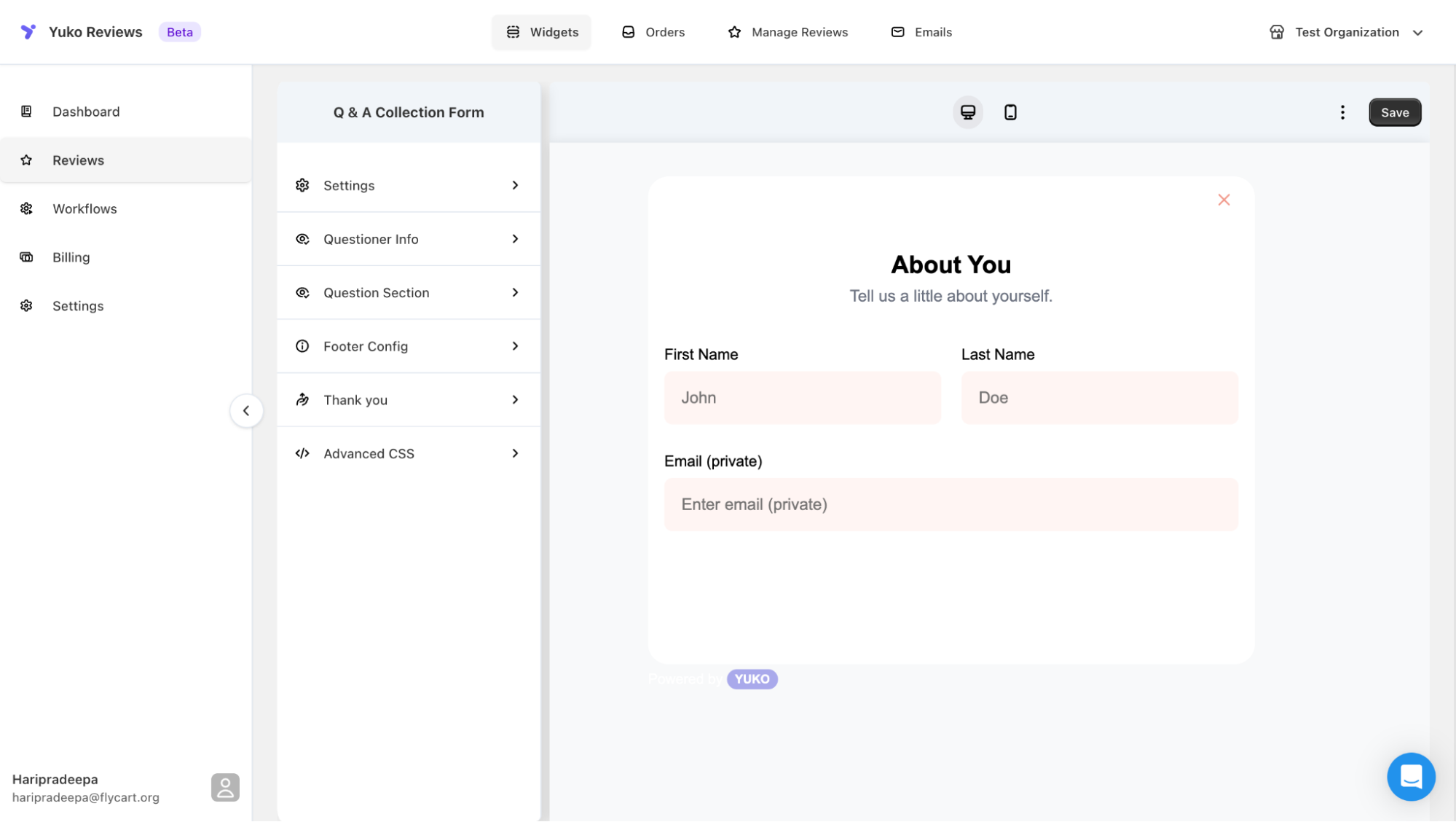
Overview
The Q&A Collection Form is what customers use to ask questions about your store.It appears as a simple section or button below the product description — fully customizable to match your theme and tone.
Form Structure Overview
The Q&A form is divided into six configuration sections:1. Settings
General appearance and functional controls for the form. You can:- Enable/disable the form
- Choose display style (inline section or button trigger)
- Configure visibility across product pages
- Adjust spacing and alignment
Available UI Customizations (Dialog & Container)
| Element | Option |
|---|---|
| Dialog Background Color | Hex color picker |
| Title Color | Adjust heading text color |
| Description Color | Customize helper/intro text color |
| Button Background Color | Set primary button color |
| Button Text Color | Adjust button label color |
| Input Border Color | Define border color for text fields |
| Label Color | Customize field label colors |
| Error Color | Set the color for validation/error messages |
2. Questioner Info
Capture essential customer details to ensure valid submissions. Fields include:- First Name
- Last Name
- Email (kept private)
- Edit field labels
- Add placeholder text
-
Choose which fields are required
Customization Options
You can also choose which fields are required for form submission.
Field Configurable Items Questioner Title e.g., About You Questioner Description e.g., Tell us a little about yourself. First Name Label e.g., First Name Last Name Label e.g., Last Name Email Label e.g., Email (private) First Name Placeholder e.g., John Last Name Placeholder e.g., Doe Email Placeholder e.g., Enter email (private)
3. Question Section
Controls how customers type and submit their question.You can customize:
- Field label → e.g., Ask a Question
- Description → e.g., Have a question about this product? We’re here to help!
- Placeholder → e.g., What would you like to know?
- Character limits
- Validation rules
- Optional help text
Configurable Fields
| Setting | Example |
|---|---|
| Question Title | Ask a Question |
| Question Description | Helpful intro text |
| Placeholder | What would you like to know? |
4. Footer Config
Configure how the footer of the form looks. You can:- Add disclaimer text
- Adjust spacing
- Show or hide “Powered by Yuko”
-
Add legal notices or guidance
Footer Button Text OptionsButton Default Text Back Button Text Back Continue Button Text Continue Submit Button Text Submit
5. Thank You
Set the message displayed after successful submission. You can:- Customize confirmation text (e.g., “Thanks! We’ll get back to you soon.”)
- Add next-step instructions
- Include optional branding elements
You can personalize:
| Setting | Example |
|---|---|
| Thank You Title | Thank You! |
| Thank You Description | Your question has been submitted successfully. We’ll get back to you soon! |
6. Advanced CSS
For full design control. You can embed CSS to:- Re-style form layout
- Adjust typography
- Modify button styles
- Support dark/light themes
- Override theme-specific limits
Form Preview
The form begins with an “About You” section where customers provide their details:- First Name
- Last Name
- Email (private and never published)
Customization Options
You can tailor the Q&A form experience with the following options:- Customize labels, placeholder text, and helper descriptions
- Match color schemes, typography, and button styles to your store theme
- Preview the form live using the desktop/mobile toggle
- Save changes to apply instantly across all product pages