
Automate Review Approval for Faster Social Proof
Manually approving every review takes time. Auto-publishing lets you automatically approve reviews that meet your criteria, so positive social proof appears instantly while questionable reviews still get your attention. What you’ll achieve:- Publish new reviews instantly (no manual work)
- Keep spam and offensive content unpublished
- Reduce daily moderation time
- Show fresh social proof to increase conversions
- Maintain review quality while speeding up workflow
Impact: Stores using smart auto-publish rules get 40-50% more reviews displayed while maintaining quality standards
How Auto-Publishing Works
Yuko automatically checks each incoming review and decides whether to publish it instantly or hold it for manual moderation — based on the rules you set.When a customer submits a review:
- Review is received with rating, text, media, and reviewer details
- Yuko evaluates it using your auto-publish settings
Auto-Publish New Reviews:
If enabled:- New reviews are auto-approved
- Review becomes visible on product pages immediately
- Added to all review widgets
- Included in average rating
If disabled: - All reviews go to Pending
- You manually approve each one
Star Rating Rules:
You choose which ratings auto-publish:- Example: Only 5-star reviews go live automatically
- Other ratings (1–4 stars) move to Pending
- Gives you tighter control over low-rated reviews
If review meets your rules → Published
- Visible instantly
- No moderation needed
- Adds to social proof
- Helps increase conversion rates
If review does NOT meet your rules → Pending
- Hidden from customers
- Requires manual approval
- You can approve, reject, or reply before publishing
- Recommended to check pending reviews daily
What typically ends up Pending:
- Ratings outside your auto-publish selection
- Low-star reviews (1–3 stars)
- First-time reviewers
- Reviews with suspicious patterns
- Reviews you want to inspect manually
What you achieve with auto-publishing:
- Faster display of positive reviews
- Reduced daily moderation workload
- Stronger and more frequent social proof
- Control over negative or uncertain reviews
How to Auto-Publish New Reviews :
Yuko Dashboard → Settings → Reviews → General → Auto-Publishing Rules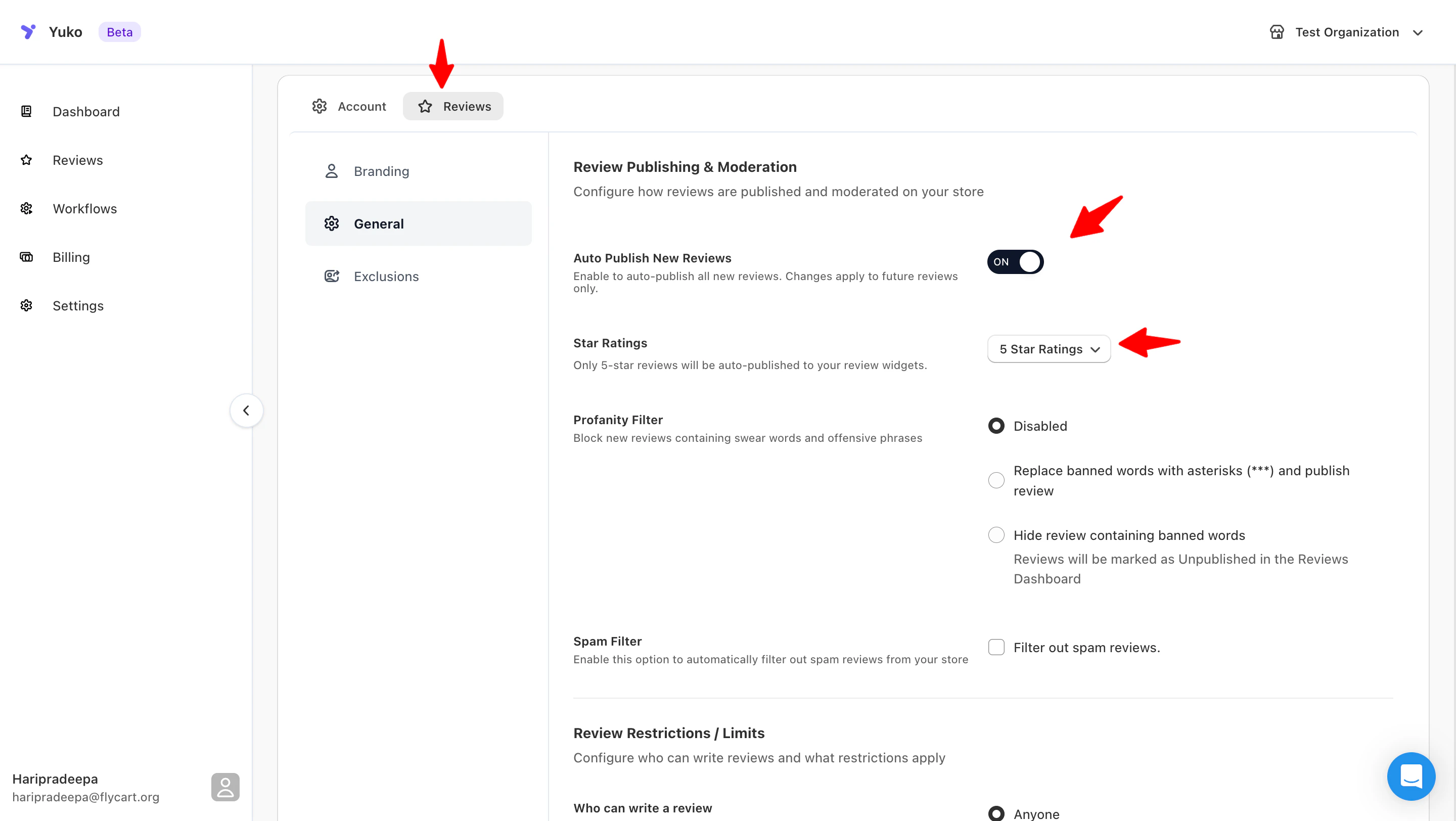
Auto Publish New Reviews
Auto Publish New Reviews
Auto-publish based on review rating
- Automatically publish all new incoming reviews.
- What happens when enabled:
- Reviews go live instantly
- No manual approval needed
- Great for fast social proof
- What happens when disabled:
- All reviews remain Unpublished
- You must approve reviews manually
- Better control, slower publishing
Star Ratings
Star Ratings
Star Ratings (Auto-Publish Rules)
Choose which star ratings should be auto-published (e.g., only 5⭐, 4–5⭐, or all). Reviews outside your selected range will be sent to Pending for manual moderation.
Choose which star ratings should be auto-published (e.g., only 5⭐, 4–5⭐, or all). Reviews outside your selected range will be sent to Pending for manual moderation.
Common Questions
Will auto-publishing hurt my store's reputation?
Will auto-publishing hurt my store's reputation?
Not if configured correctly with good filtersRisks of auto-publishing:
- Spam reviews go live
- Negative reviews appear before you can respond
- Low-quality reviews published
- Fake reviews slip through
- Auto-publish only verified purchases
- Reduces fake reviews by 95%
- Most important protection
- Auto-publish 4-5 stars only
- Manual review negative feedback
- Respond before publishing low ratings
- Keyword filters
- Email blacklist
- Multiple review detection
- Auto-flag suspicious patterns
- Check published reviews daily
- Quick spam removal
- Respond to negative reviews within 24 hours
- Adjust rules based on issues
- Begin with manual moderation
- Learn your review patterns
- Add auto-publish gradually
- Tighten rules if spam increases
- 99% of verified purchase reviews are legitimate
- Auto-publishing speeds up social proof by 50%
- Manual moderation doesn’t prevent all spam
- Can remove bad reviews quickly if they slip through
Best practice: Auto-publish verified 4-5 star reviews only. This is safe for 99% of stores and dramatically speeds up social proof building.
Can I change auto-publish settings after launch?
Can I change auto-publish settings after launch?
Yes - adjust anytime based on resultsCommon adjustments:Tighten rules if:
- Spam increasing
- Low-quality reviews appearing
- Negative reviews need more attention
- Growing too fast to monitor
- Too much manual work
- Missing social proof opportunity
- Spam filters working well
- Review volume overwhelming moderation
- Go to Settings → Reviews → Auto-Publishing
- Update rules
- Save changes
- Applies to new reviews immediately
- Existing reviews unaffected
- Make small adjustments
- Monitor for 7 days
- Check spam rate and moderation time
- Adjust again if needed
- Holiday season: More conservative (higher volume)
- Slow periods: More aggressive (need reviews)
- Product launches: Manual review initially
- After issues resolved: Back to auto-publish
Should I auto-publish reviews with photos?
Should I auto-publish reviews with photos?
Yes - photo reviews are valuable and usually legitimateWhy auto-publish photo reviews:Exception handling:
- Higher trust: Customers who upload photos usually genuine
- More effort: Spammers rarely add photos
- Valuable content: Photo reviews convert 3x better
- Customer engagement: Reward customers who go extra mile
- Auto-publish ANY review with photos (even 3-star if has photos)
- Photos indicate authentic customer
- Rarely spam
- Inappropriate photos → Auto-detect and hold
- Competitor product photos → Manual review
- Offensive images → Spam filter catches
- Some platforms auto-approve photo reviews regardless of rating
- Rewards customer effort
- Increases photo review rate
- Generally safe (legitimate customers upload photos)
- 3-star review with photos goes live
- But: Photo provides context
- Customers see authentic feedback
- You can still reply
Recommended: Auto-publish all reviews with photos, regardless of rating. Photo reviews are 95% legitimate and highly valuable for conversion.
Need Help?
Book a Free Setup Call
Talk to our team for personalised setup help.Time: 30 minutes
Contact Support
Visit our support hub for help articles, live chat and ticket submission.
Browse the Guides
Documentation across loyalty, referrals, memberships and more.
Install Yuko
Add Yuko to your Shopify store from the Shopify App Store.
Pro tip: Start with conservative auto-publish rules (4-5 stars + verified only). After 30 days, loosen restrictions if spam is low. It’s easier to start strict and loosen than to deal with spam from being too permissive.