
Let Customers Review Directly on Your Store
The review collection form is where customers write reviews on your website. While most reviews come from email requests (5-10% response rate), on-site forms capture 1-2% of visitors who want to leave feedback without being asked. Every review counts. What you’ll achieve:- Add “Write a Review” buttons to product pages
- Collect reviews from customers browsing your store
- Customize form appearance to match your brand
- Make reviewing easy and mobile-friendly
- Capture organic reviews from happy customers
Impact: Organic reviews from on-site forms are often more detailed and authentic than email-prompted reviews
How the Review Form Works
Navigation: Yuko Dashboard → Reviews → Widgets → Review Collection Form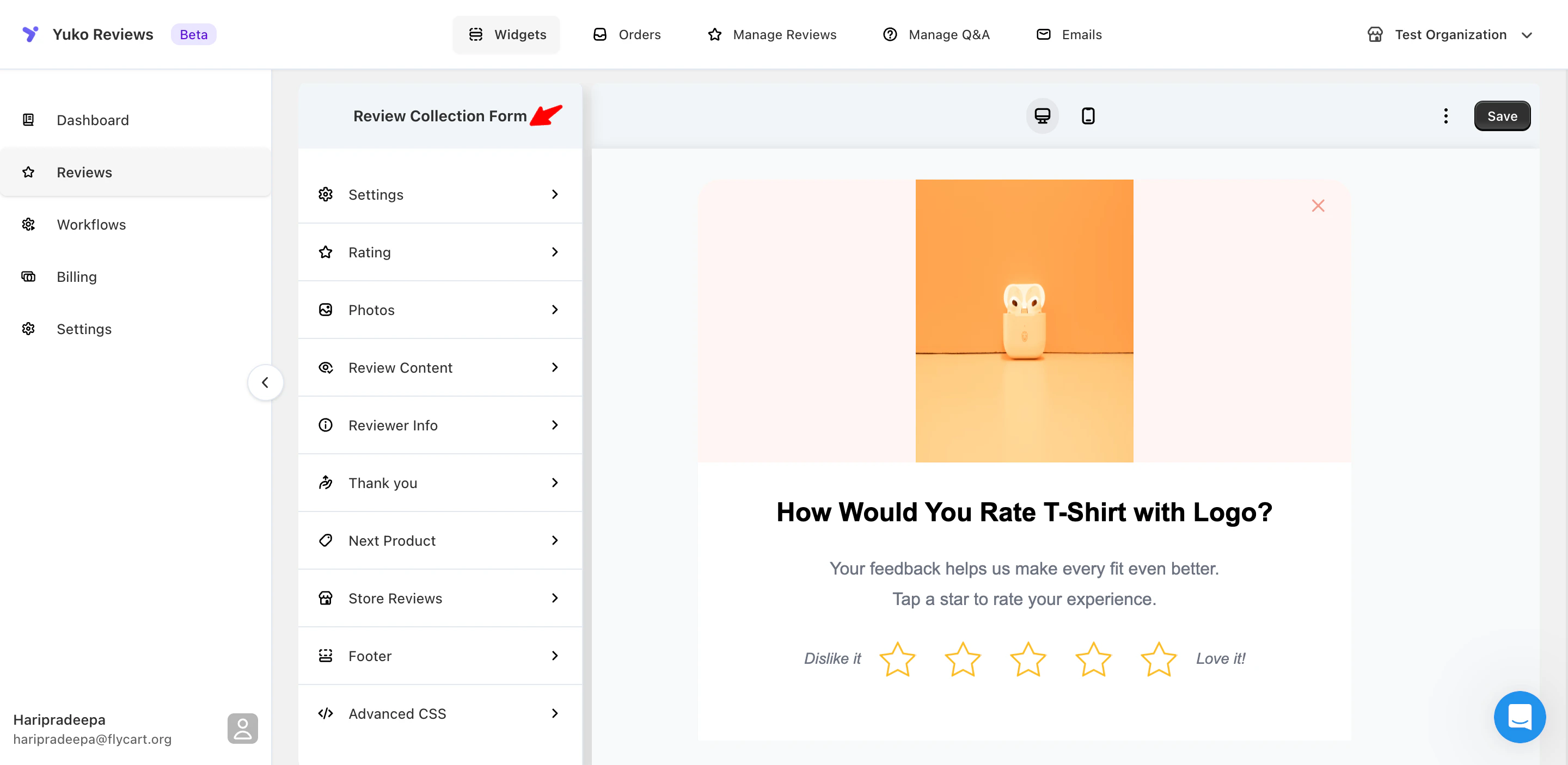
Customer Journey
The Review Collection Form allows customers to leave feedback directly on your store. Here’s how it works step by step:Customer Clicks Write Review
Customer is on a product page and clicks “Write a Review” button.Where they see it:
- Below product description
- In reviews section
- After purchase confirmation
- On “My Orders” page
Review Form Opens
Form modal or page opens with customized fields.What they see:
- Star rating selector (1-5 stars)
- Review title field (optional)
- Review text area
- Photo upload option
- Name and email fields
Customer Completes Form
Customer fills in rating, writes review, optionally adds photos.Typical completion time: 2-3 minutes for text review, 4-5 minutes with photos
Customer Submits
Review is submitted and enters your moderation queue or publishes immediately.What happens:
- Thank you message displays
- Review awaits approval (if manual moderation)
- Or appears on site instantly (if auto-publish enabled)
Form Customization Options
Make the form match your brand and optimize for conversions:1. Dialog Appearance (Form Container):
1. Dialog Appearance (Form Container):
- Background color, border radius, shadows
- Button styles and colors
- Input field design
- Typography (font family, sizes)
- Spacing and padding
- Use your brand colors
- Match site button styles
- Consistent fonts
- Add your logo in the header
- Keep the form clean and minimal
- Ensure high contrast for readability
- Mobile-friendly sizing
- Clear call-to-action buttons
- Pro tip: Match your form to your checkout design
Star Rating Experience
Star Rating Experience
Customize the star rating experience:
- Rating Question: Default: “How would you rate this product?”
- Examples: “What did you think?”, “Rate your experience”, “Overall satisfaction?”
- Rating Labels:
- 1 star (min): “Poor”, “Not great”, “Disappointed”
- 5 stars (max): “Excellent”, “Amazing”, “Love it!”
- Mid-range: “It’s okay”, “Good”, “Great”
- Additional Options:
- Short description under the question
- Required vs optional (always make required)
- Half-star ratings not recommended
- Keep the question simple and clear
- Use positive language for max rating
- Avoid negative language for min rating
Visual Reviews (Photo Uploads)
Visual Reviews (Photo Uploads)
import NeedHelp from ‘/snippets/need-help.mdx’;
- Button Customization:
- Text: “Add photos”, “Upload images”, “Show us!”
- Icon and color, placement above or below text
- Upload Prompts:
- “Show your new look!”
- “Share how it turned out!”
- “Let others see it in real life”
- “Upload unboxing photos”
- Technical Settings:
- Max photos per review: 5 recommended
- Video support (optional), max length 30 sec
- File size limits, accepted formats: JPG, PNG, HEIC, MP4
- Make uploads optional
- Show example submissions
- Enable one-tap upload on mobile
- Clear guidance for file size/format
- Compress large files automatically
- Example: “Get 10% off for photo reviews!”
- Display above upload button
Text Input Sections
Text Input Sections
- Review Title Field:
- Label examples: “Review Title”, “Headline”, “Summary”
- Placeholder: “Summarize your experience…”
- Optional, character limit: 50–100
- Review Text Area:
- Label: “Your Review”, “Tell us more”
- Placeholder: “What did you like? How did it fit? Would you recommend it?”
- Optional but encouraged
- Min 20 characters, max 500–1000
- Guidance Text Examples:
- “Share details about quality, fit, and value”
- “Help other shoppers make confident decisions”
- “What should others know about this product?”
- Keep labels short and clear
- Use helpful placeholder text
- Suggest topics to cover
- Show live character count
Finding the balance: Optional review text gets more submissions but shorter reviews. Required text (minimum 20 characters) gets 30% fewer submissions but much better quality.
Customer Details
Customer Details
- Name Field:
- Label: “Your Name”, “Display Name”
- Required for credibility
- Option to display publicly
- Email Field:
- Label: “Email”, “Email Address”
- Required for verification
- Never displayed publicly, used for verified purchase badge
- Location (city/country)
- Age range
- Product usage
- Purchase occasion
- Add disclaimer: “Your email will never be shared”
- Link to privacy policy, GDPR compliance if needed
- Only ask for name and email minimum
- Explain why email is needed
- Make additional fields optional
- Highlight verified purchase badge
Thank You Message
Thank You Message
Celebrate the submission:Customization options:
- Message text
- Emoji and styling
- Incentive announcement
- Next steps
- “Thanks for reviewing! You just made our day 💛”
- “Amazing! Your review helps other shoppers. Check your email for a thank-you discount!”
- “Review submitted! We’ll send you a reward code within 24 hours.”
- “Thank you! Your feedback makes us better.”
- Genuine thanks
- What happens next (approval process)
- Reward details if applicable
- Invitation to review other products
- Be warm and personal
- Mention any rewards
- Set expectations (approval time)
- Encourage sharing on social
- Link to their order history
Advanced Customization
Advanced Customization
For developers and power users:Custom CSS:
- Override any default styles
- Match exact brand guidelines
- Custom animations
- Responsive breakpoints
- Form validation logic
- Analytics tracking
- A/B testing variants
- Dynamic field showing/hiding
- Send reviews to other platforms
- Sync with CRM
- Trigger automations
- Custom notifications
- Test changes on staging first
- Ensure mobile compatibility
- Don’t break accessibility
- Monitor form completion rates
Next Steps
Customize Form Appearance
Match the review form to your brand colors and style.Time: 15 minutes Location: Reviews → Widgets → Review Collection Form → Design
Add Form to Product Pages
Embed the “Write a Review” button on all product pages.Time: 10 minutes (varies by platform) Implementation: Add widget code to product template
Test on Mobile
Verify the form works perfectly on actual mobile devices.Time: 10 minutes Test: Photo upload, form submission, thank you page
Set Up Review Request Emails
Combine on-site forms with automated email requests for maximum reviews.Time: 10 minutes → Review Request Email Setup
Need Help?
Pro tip: The on-site form is important, but email review requests drive 80% of reviews. Set up both, but prioritize getting review request emails working first.