Get 2-3x More Photo Reviews with Small Rewards

Photos make reviews 3x more trustworthy and increase product page conversions by 20%. Offering a small reward (10% off or $5 credit) for photo reviews increases photo submission rates from 10% to 30-40%. What you’ll achieve:
  • Thank customers immediately for adding photos
  • Encourage more customers to include photos (2-3x increase)
  • Build customer loyalty with appreciation rewards
  • Boost conversion rates with visual social proof
Impact: 2-3x more photo reviews | Typical reward: 10% off or $5-10 credit

How It Works

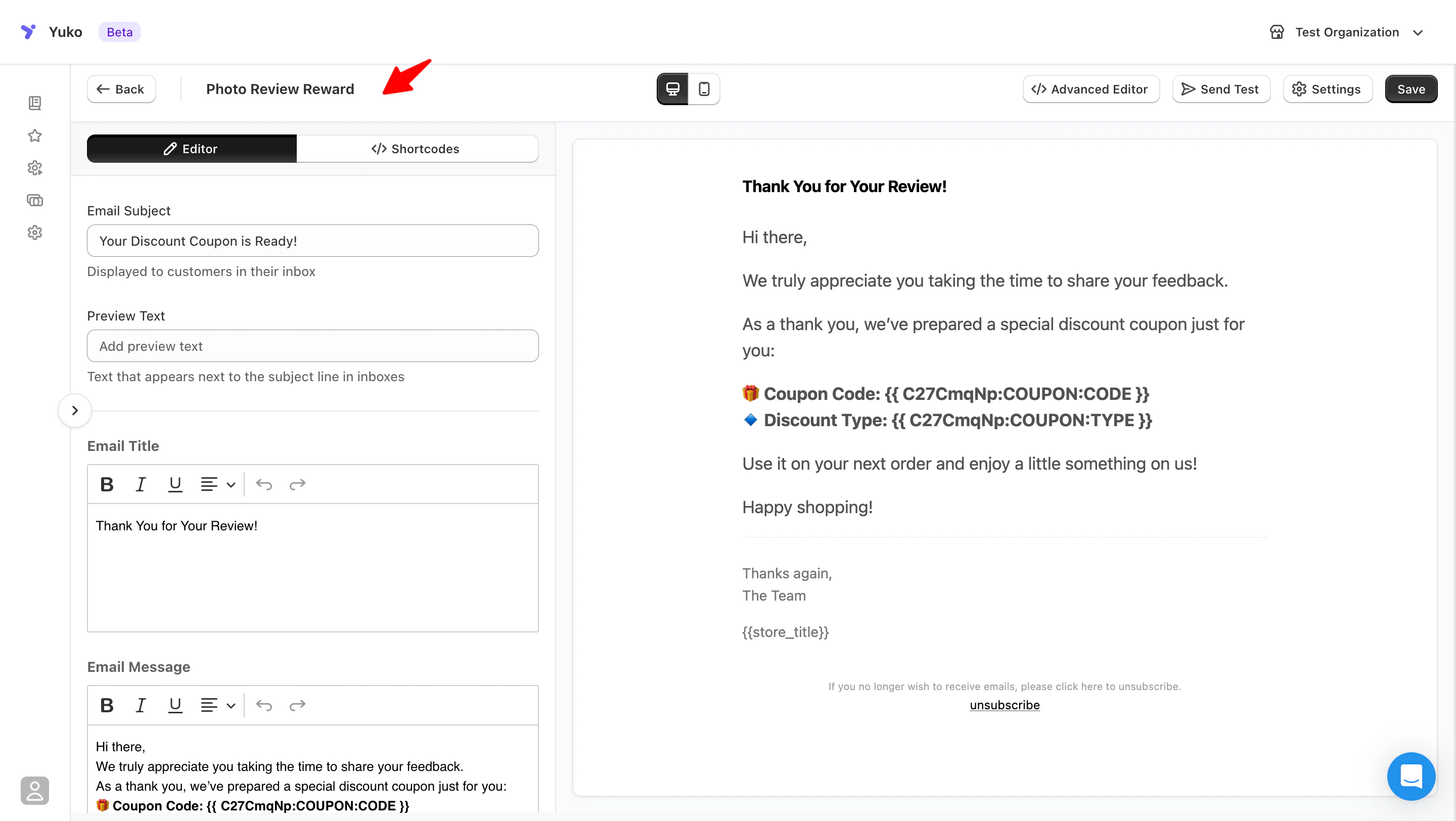
Yuko Dashboard → Reviews → Emails → Photo Review Reward Email Photoreviewreward Pn
The Automatic Process

Customer Submits Review with Photo

Customer writes a review and uploads one or more photos of the product.

Yuko Detects Photo

Yuko automatically detects that the review includes photos.Smart detection: Works whether customer adds photo during initial review or adds it later.

Reward Email Sends Immediately

Within minutes, customer receives thank-you email with their reward code.Timing: Instant gratification = happier customers

Customer Uses Reward

Customer applies discount code on their next purchase.Result: You got valuable photo review + increased customer lifetime value.

Why Photo Reviews Matter

Build Trust

Photos = Authenticity
  • Text reviews can be fake
  • Photos prove real customers
  • Shoppers trust photos 3x more
  • Reduces “is this real?” doubts
Impact: Higher trust = more sales

Show Real Results

Visual Proof
  • See product in real settings
  • Understand sizing/fit/colors
  • Spot potential issues
  • Get styling ideas
Impact: Reduces returns by 15%

Increase Conversions

Numbers Don’t Lie
  • Products with photo reviews convert 20% better
  • Photos increase time on page (engagement)
  • Visual reviews answer unspoken questions
  • Reduce cart abandonment
Impact: More sales from same traffic

Stand Out

Competitive Advantage
  • Most products have less than 5% photo reviews
  • Your 30% photo rate = huge advantage
  • Better looking product pages
  • More social proof
Impact: Beat competitors on same products

Reward Settings

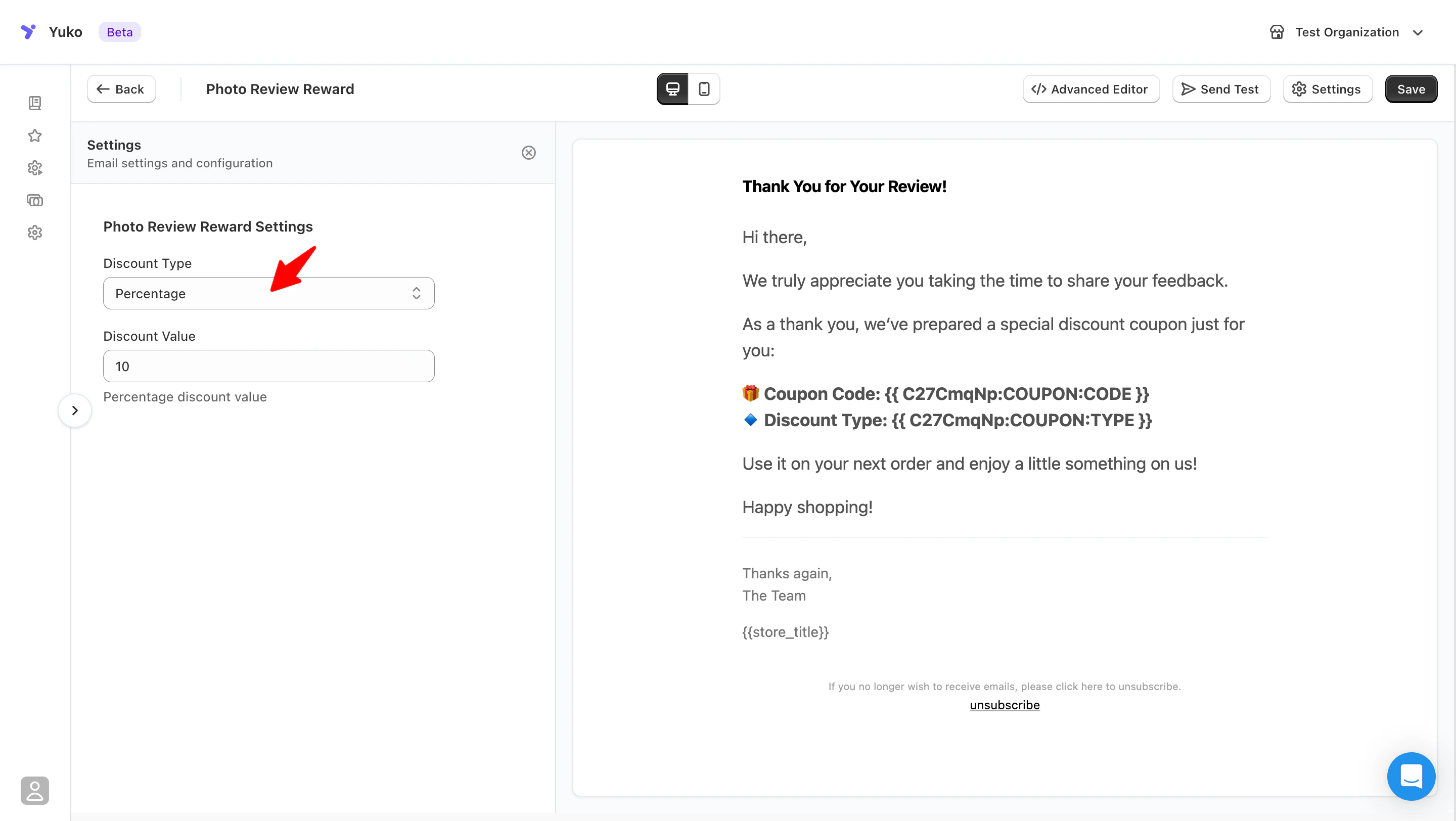
Discount Type: Choose Your Reward

Three reward options:Example: 10% off next orderPros:
  • Simple to understand
  • Works for any order size
  • Perceived as generous
  • Easy to communicate
Best for: Most storesTypical amount: 10-15%

2. Fixed Amount Discount

Example: 5or5 or 10 off next orderPros:
  • Clear, specific value
  • Good for lower-priced products
  • Customers know exact savings
  • Easy to budget
Best for: Stores with lower average order values ($30-50)Typical amount: 55-10

3. Free Shipping

Example: Free shipping on next orderPros:
  • No discount on products (protects margins)
  • Highly valued by customers
  • Simple to fulfill
  • Works with existing shipping setup
Best for: Stores with $5-10 shipping costsNote: Only valuable if you normally charge for shipping
Most effective: 10% off next order is the sweet spot - generous enough to motivate, small enough to be profitable.
Setting: Discount Value (for percentage or amount discounts)Finding the right amount:
DiscountMotivation LevelWhen to Use
5% offLowEstablished stores with many reviews
10% offGoodSweet spot for most stores
15% offHighNew stores building review base
20%+ offVery HighRarely needed, cuts into margins
$5 offMediumProducts under $50
$10 offHighProducts $50-100
$15+ offVery HighExpensive products $100+
General guidelines:
  • New store: Start with 15% to build momentum
  • Established store: 10% is plenty
  • High-margin products: Can afford 15-20%
  • Low-margin products: Stick to 10% or free shipping
Don’t go too high: 25%+ discounts train customers to only buy with coupons. You’ll lose money long-term.
Setting: Email Editor (Title, Message, Footer)What makes a good thank-you email:Tone:
  • Genuinely grateful (not fake corporate)
  • Excited about the photo
  • Personal and warm
  • Not overly promotional
Example structure:
Subject: Thanks for the awesome photo! 🎁

Hi {{review_author_name}},

We just saw your review with photos - thank you so much for sharing!

Your photos help other customers see how [Product] looks in real life. That's incredibly valuable.

As a thank-you, here's {{YOUR_REWARD:COUPON:VALUE}} off your next order:

Code: {{YOUR_REWARD:COUPON:CODE}}
Expires: {{YOUR_REWARD:COUPON:EXPIRY}}

[Shop Now Button]

Thanks again for being an amazing customer!

[Your Name]
[Store Name]
What to include:
  • Specific mention of “photos” (not just “review”)
  • Why photos matter
  • Clear reward details (code, amount, expiry)
  • Easy redemption (shop now button)
  • Genuine gratitude
Personal touch: Mention the specific product they reviewed to show you’re paying attention: “Thanks for the photos of the [Product Name]!”
Setting: Timing (instant vs delayed)Two options:Sends: Within 1-5 minutes of photo submissionPros:
  • Immediate gratification
  • Customer still thinking about their review
  • Reinforces positive behavior instantly
  • Higher reward redemption rate
Best for: Most stores

Delayed

Sends: Hours or days laterPros:
  • Can batch with other communications
  • Gives time to moderate review first
Cons:
  • Less impactful
  • Customer may forget they submitted photos
  • Lower emotional connection
Best for: Stores that manually approve all reviews
Psychology tip: Instant rewards create stronger behavioral reinforcement. Customers associate “photo = immediate reward” and are more likely to add photos in future orders.

Available Shortcodes

Information about their review:
  • {{review_rating}} - Star rating (1-5)
  • {{review_author_name}} - Customer’s name
  • {{review_content}} - Their review text
  • {{review_product_name}} - Product they reviewed
  • {{review_product_url}} - Link to product page
  • {{review_link}} - Link to their review
  • {{review_created}} - When they submitted
Example:
Thanks for your review of {{review_product_name}}!

Best Practices

Always expire reward codesRecommended expiry:
  • 30 days: Good balance (most common)
  • 60 days: Generous, but risk of forgetting
  • 90 days: Too long, customers lose urgency
  • 14 days: Too short, feels pressured
Why expiration matters:
  • Creates urgency to return and shop
  • Prevents old codes from lingering
  • Encourages repeat purchases sooner
  • Easier to manage/track
Sweet spot: 30-day expiration. Long enough to not feel pressured, short enough to drive action.
Code format tips:Good codes:
  • PHOTO10 (simple, clear)
  • THANKS10 (explains why)
  • REVIEW15 (easy to remember)
Bad codes:
  • XR2K9-P4L7Q-9WMZ (too complex)
  • photo_review_discount_2024 (too long)
  • phot0rev1ew (confusing with numbers/letters)
Best practices:
  • 6-10 characters maximum
  • All caps or all lowercase (not mixed)
  • No special characters
  • Easy to type on mobile
  • Memorable
Auto-apply option: Even better - provide link that auto-applies the code at checkout. No typing needed!
Protect against gaming the system:Set these limits:
  • One reward per customer per order
  • Can’t combine with other discounts
  • Minimum order value (optional)
  • Single-use codes (no sharing)
Watch for:
  • Same customer submitting multiple photo reviews to farm codes
  • Low-effort photos (blurry, poor quality)
  • Photos that don’t match product
Solutions:
  • Review photos before auto-sending rewards (if you’re concerned)
  • Set minimum review text length (prevents spam reviews)
  • Limit to one photo reward per customer per month
Moderate if needed: If you see customers abusing the system (uploading random photos just for rewards), switch to manual reward approval.
Make sure customers can actually use the reward:Test checklist:
  1. Send yourself a test reward email
  2. Copy the code
  3. Go to your store
  4. Add item to cart
  5. Apply code at checkout
  6. Verify discount appears correctly
  7. Complete test order (or cancel)
Common issues:
  • Code doesn’t apply (check WooCommerce coupon settings)
  • Discount amount wrong (verify coupon value)
  • Code expired immediately (check expiry date formula)
  • Code already used (make sure test codes are single-use)
Test regularly: Test photo reward flow every few weeks to catch any issues before customers experience them.

Common Questions

Let’s do the math:Assumptions:
  • 100 orders/month
  • 10% review rate = 10 reviews
  • 40% include photos with reward = 4 photo reviews
  • 10% discount reward
  • $60 average order value for reward redemption
Cost calculation:
  • 4 customers get 10% off 60=60 = 6 discount each
  • Total cost: $24/month
  • You get: 4 valuable photo reviews
ROI:
  • Photo reviews increase conversion by 20%
  • Even small conversion boost pays for rewards many times over
  • Plus increased customer lifetime value from return visits
Bottom line: Photo rewards typically pay for themselves 5-10x over.
Our strong recommendation: Photo reviews onlyWhy photos only:
  • Photos provide more value (visual proof)
  • Higher reward = higher quality (customers put in effort)
  • Prevents reward farming (text review spam)
  • Focuses rewards on high-value content
Text review rewards:
  • Lower incentive (5% vs 10% for photos)
  • Or no reward (just ask nicely)
  • Reserve big rewards for photo reviews
Example strategy:
  • Text review: Thank you email (no reward)
  • Photo review: 10% off reward
  • Video review: 15% off reward (if you accept videos)
Tiered rewards work: Customers understand that more effort (photos) = better reward. This feels fair and motivates quality submissions.
This happens occasionally:Examples of “reward farming”:
  • Blurry, unclear photos
  • Photos of packaging only (not product)
  • Random unrelated images
  • Stock photos (stolen from internet)
How to handle:Option 1: Manual approval
  • Review photos before sending rewards
  • Only reward quality photos
  • Reject spam photos
  • More work, but more control
Option 2: Post-review moderation
  • Auto-send rewards immediately
  • Check photos periodically
  • Reject/hide poor photos after the fact
  • Customer keeps reward (easier than taking it back)
Option 3: Set expectations
  • Email message: “Clear photos that show the product”
  • Review form: Minimum photo quality guidelines
  • Examples of good vs bad photos
Reality check: 95% of customers submit genuine photos. Don’t overthink this - a few bad apples aren’t worth complicating the system for everyone.
No, and that’s intentionalWhy rewards are for NEXT order:
  • Encourages repeat purchases
  • Increases customer lifetime value
  • Brings customers back to your store
  • Creates ongoing relationship
What customers expect:
  • They understand “next order” means future purchase
  • Standard practice across e-commerce
  • Fair trade for leaving photo review
Make it clear:
  • Subject line: “For your NEXT order”
  • Email body: “Use on your next purchase”
  • Expiry date: “Valid for 30 days”
The goal: Photo reward isn’t just “payment” for review - it’s an excuse to get customers to come back and shop again.
Yuko handles this automatically:Scenario 1: Photo added later
  • Customer submits text review (no photo)
  • Days/weeks later, adds photo to their review
  • Yuko detects photo addition
  • Sends reward email automatically
Scenario 2: Multiple photos
  • Customer adds one photo (gets reward)
  • Later adds more photos
  • No additional reward (one reward per review)
Scenario 3: Multiple products reviewed
  • Customer orders 3 products
  • Reviews all 3 with photos
  • Gets one reward email (not three separate emails)
  • All photos mentioned in thank-you
This is good: Customers can submit text review quickly, then add photos when they have more time. You still get photos and they still get rewarded.

Next Steps

Choose Your Reward

Decide on reward type and amount.Recommended: 10% off next order Location: Reviews → Emails → Photo Review Reward Email

Write Thank-You Message

Create genuine, warm thank-you email.Time: 5 minutes Tone: Grateful and appreciative

Set 30-Day Expiry

Configure expiration date for reward codes.Why: Creates urgency without pressure

Test Complete Flow

Submit test review with photo and verify reward email sends correctly.Check:
  • Email arrives quickly
  • Code works at checkout
  • Discount applies correctly
  • Expiry date is accurate

Enable & Monitor

Turn on photo rewards and watch photo submission rate increase.Expected: Photo rate increases from 10% to 30-40% within 30 days

Need Help?

Pro tip: Photo rewards have the highest ROI of any review feature. Stores see 2-3x more photo reviews with rewards, and those photos increase conversion rates by 20%. This feature pays for itself many times over.