
Learn how to Migrate WooCommerce Reviews in Minutes
Already have product reviews in WooCommerce? Import them to Yuko instantly with our automatic one-click import. All your reviews, ratings, and verified purchase badges transfer seamlessly — no CSV files or manual work required. What you’ll achieve:- Import all WooCommerce reviews automatically
- Preserve star ratings and review dates
- Maintain verified purchase status
- Keep reviewer information intact
- Switch to Yuko without losing social proof
Impact: WooCommerce import takes 2-30 minutes depending on review count. All reviews automatically mapped to correct products.
Why Import WooCommerce Reviews
One-Click Import
No manual work required
- One-click automatic import ( Simply Sync in the Settings -> Integrations -> WooCommerce -> Configure -> Sync )
- No CSV files to format
- No product ID mapping needed
- Yuko auto-matches reviews to products
- Fully automated process
Complete Data Transfer
Everything transfers
- All review text and titles
- Star ratings (1-5)
- Reviewer names and emails
- Review dates (preserved)
- Verified purchase badges
- Approval status
Verified Purchase Status
Maintain trust badges
- WooCommerce “Verified Owner” preserved
- Converts to Yuko “Verified Purchase”
- Shows on reviews automatically
- Maintains credibility
Safe Migration
Your data stays safe
- Original WooCommerce reviews unchanged
- Duplicate prevention (won’t import twice)
- Can re-import if needed
- Rollback friendly
Step-by-Step Import Instructions
Yuko Dashboard → Settings → Integration → WooCommerceStep 1 : Open WooCommerce Integration
Step 1 : Open WooCommerce Integration
- Go to Settings → Integrations → WooCommerce
- This page manages your store connection and sync settings
Step 2: Connect Your WooCommerce Store
Step 2: Connect Your WooCommerce Store
- If your store is not connected, click Connect WooCommerce Store
- Enter your store URL
- Authorize access
-
Once connected, the integration will show as Active
Fix: Ensure correct store URL format (https://yourstore.com)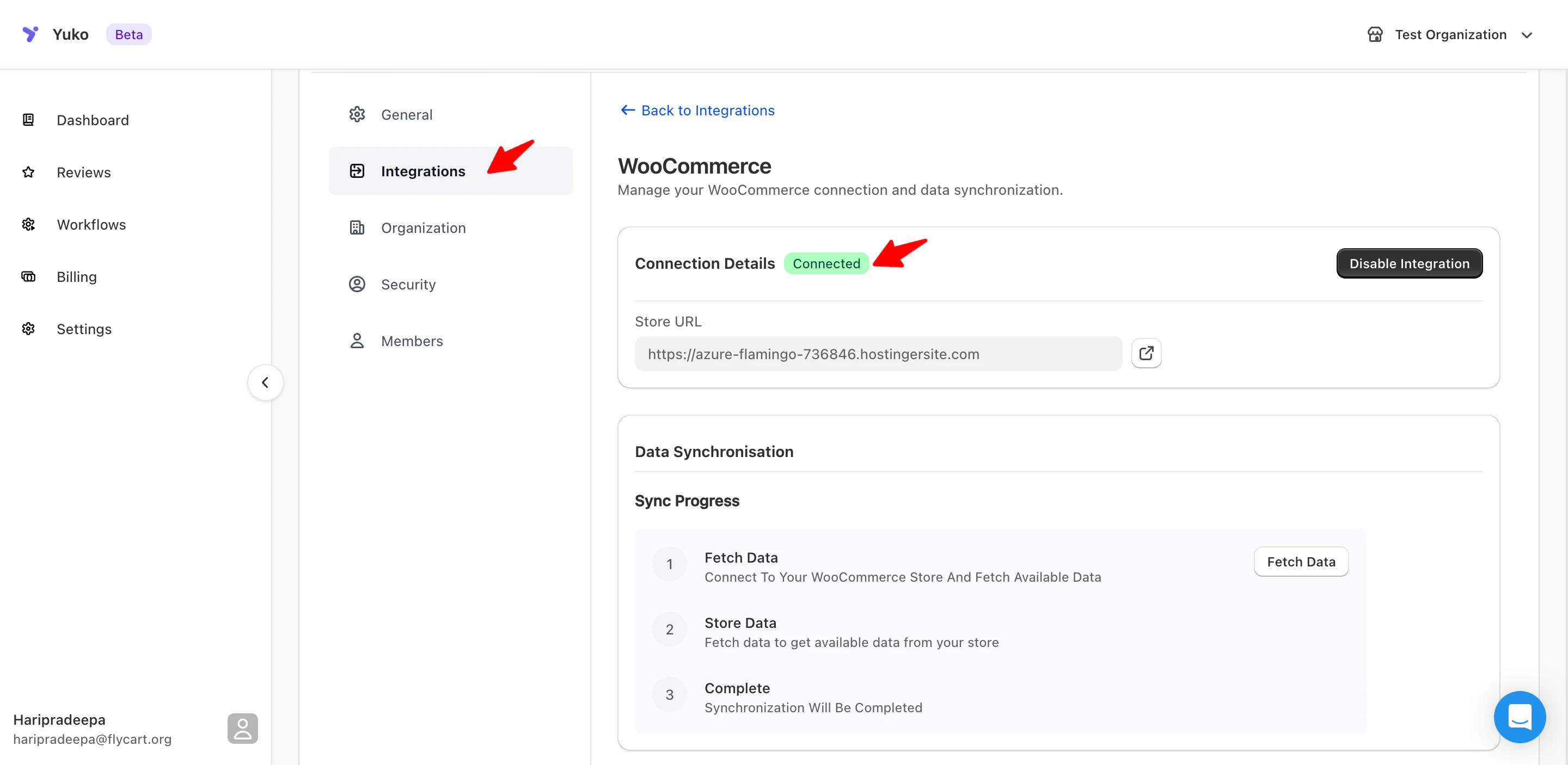
Step 3: “Data Synchronisation”
Step 3: “Data Synchronisation”
- Locate the Data Synchronisation section
- This area controls how customers, products, and reviews are imported into Yuko
Step 4: Click “Fetch Data”
Step 4: Click “Fetch Data”
- Click Fetch Data to pull customer, product, and review information from WooCommerce
-
Yuko will display how many items were found (e.g., customers, products)
Why this matters: - Allows Yuko to fetch WooCommerce review records.
Step 5: Enable Review Import
Step 5: Enable Review Import
- Go to Settings → Integrations → WooCommerce
- Scroll to Data Synchronisation / Store Data
- Under Store Data, find the checkbox **Include Reviews **
-
Enable Include Reviews (check the box)
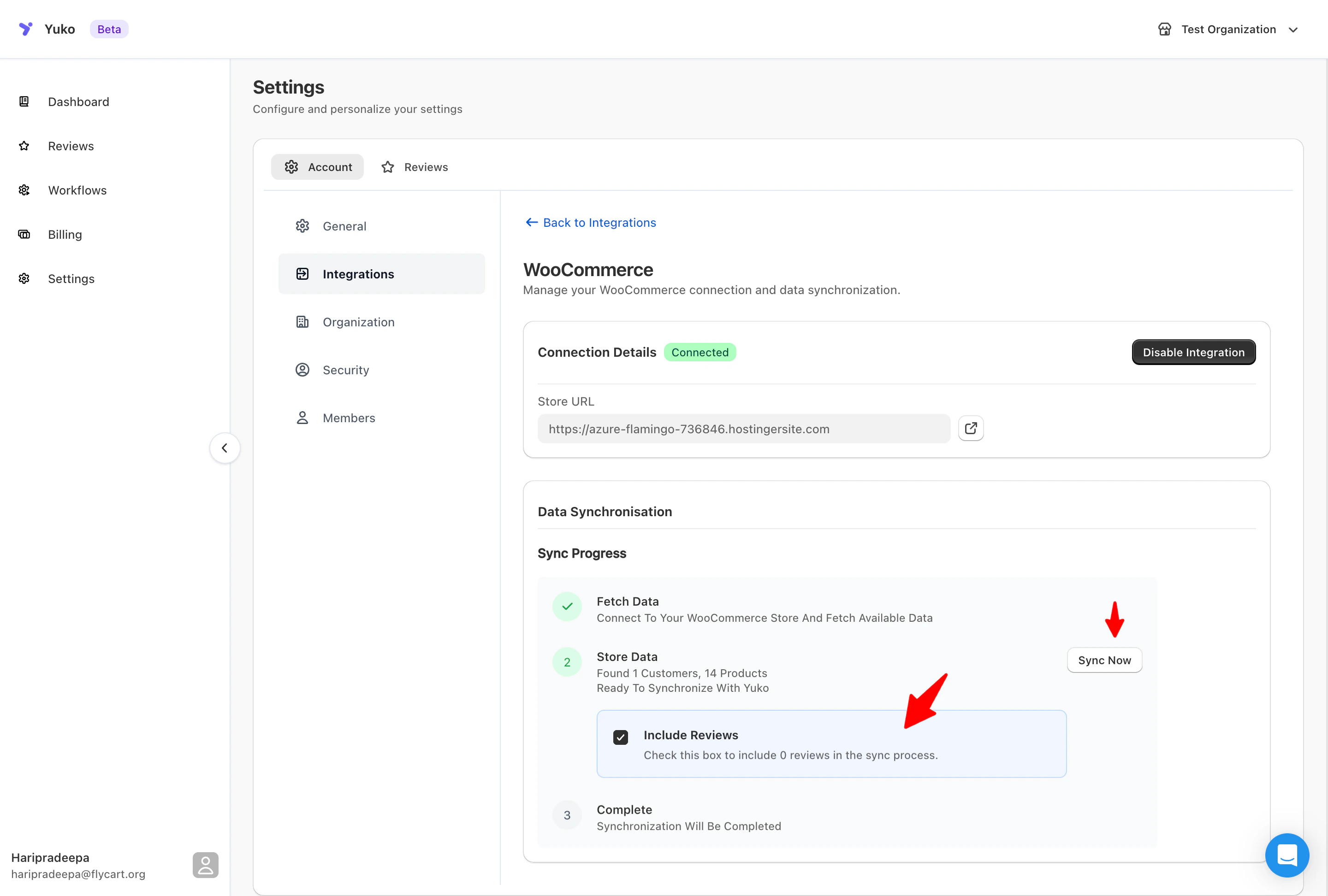
- Save settings
Step 6: Review Import Summary
Step 6: Review Import Summary
- After enabling the checkbox, the sync will continue
-
Status indicators (Customers, Products, Reviews) will show In progress
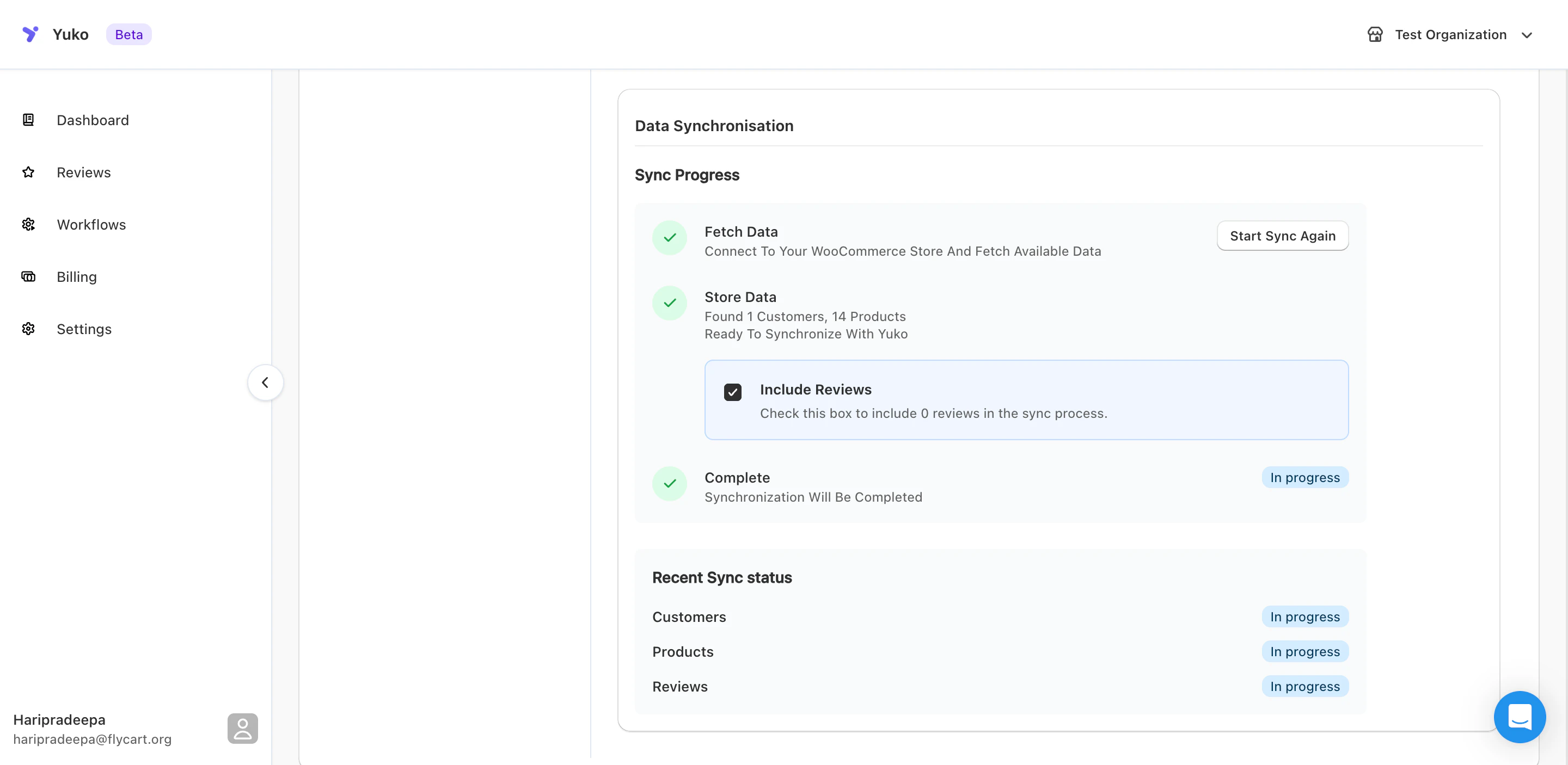
- They will automatically switch to Completed once the sync finishes
After Import: Next Steps
Verify Imported Reviews
Check that reviews imported correctly.Verification checklist:
- Total count
- Random sampling: Check 10-20 random product pages
- Verified badges: Ensure verified purchases show badge
- Dates: Confirm original dates preserved (not all “today”)
- Product assignment: Reviews on correct products
Set Up Review Display Widgets
Install Yuko widgets to show imported reviews on your store.Required for reviews to appear:
- Go to Yuko Dashboard → Reviews → Widgets
- Install Product Review Widget
- Install Star Rating Widget
- Place widgets on product pages
- Verify reviews displaying
Need Help?
Book a Free Setup Call
Talk to our team for personalised setup help.Time: 30 minutes
Contact Support
Visit our support hub for help articles, live chat and ticket submission.
Browse the Guides
Documentation across loyalty, referrals, memberships and more.
Install Yuko
Add Yuko to your Shopify store from the Shopify App Store.
Pro tip: Before importing, verify all your WooCommerce products are already in Yuko. This ensures perfect product matching. Then run a test import with 20 reviews to verify everything works before importing your full review database.