
Stay in Control of Your Review Content
Your reviews shape how shoppers perceive your store.Yuko’s Review Management Dashboard gives you all the tools you need to moderate, organize, and maintain a clean, trustworthy review section. With clear statuses, powerful filters, and quick actions, you can keep your reviews accurate, authentic, and aligned with your brand.
What You Can Do
- Approve or reject reviews before they appear on your store
- Flag or remove spam and inappropriate submissions
- Reply directly to customers to build trust and transparency
- Filter reviews by status, replies, and favorites for easier management
- Maintain a consistent, high-quality review presence across your store
Impact: Stores that actively moderate and reply to reviews see 20-30% higher conversion rates and better customer trust scores
Why Active Review Management Matters
Maintain Quality Standards
Filter out low-quality content
- Approve genuine reviews
- Reject low-quality or irrelevant content
- Remove spam or fake reviews
- Hide reviews with inappropriate language
- Ensure published reviews add value
Result: Higher quality reviews = higher conversion rates
Engage with Customers
Show you care about feedback
- Reply to positive reviews (thank customers)
- Address negative reviews (resolve issues)
- Answer questions in reviews
- Show responsiveness
- Build relationships
Prevent Reputation Damage
Stop harmful content early
- Flag suspicious or spammy content
- Remove competitor attacks
- Hide offensive or harmful language
- Prevent fake reviews from appearing
Result: Clean review section maintains customer trust
Gain Business Insights
Learn from customer feedback
- Identify repeated customer issues
- Spot product quality trends
- Discover improvement opportunities
- Track sentiment over time
Result: Better products and customer satisfaction
Review Management Dashboard
Yuko Dashboard → Reviews → Manage Reviews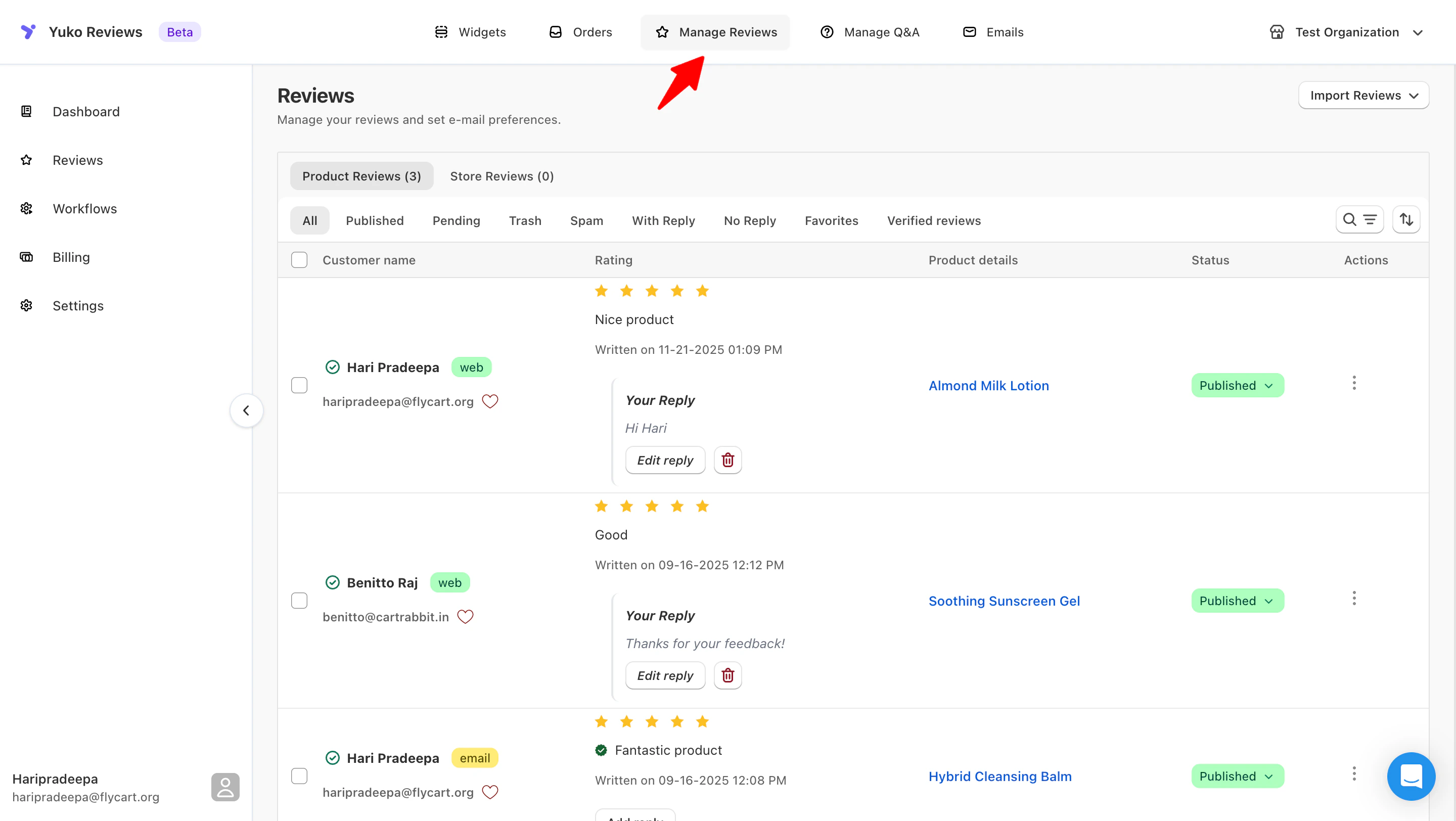
Review Status Types
Every review has a status that determines whether it’s visible to customers:- Published
- Pending
- Spam
- Trash
Reviews visible on your storeWhat this means:
- Shown on product pages and review widgets
- Counted toward average ratings
- Included in search-indexed content
- Fully visible to shoppers
- Helpful, constructive feedback
- Verified or genuine reviews
- Clear and appropriate language
- Reviews that add value to your store
Review Filters and Search
Find specific reviews quickly with advanced filtering:Search by Review Status
Search by Review Status
View reviews by approval statusAll Reviews:
- Shows every review regardless of status
- Includes Approved + Pending + Spam + Trash
- Displays total review count
- Default dashboard view
- Reviews currently live on your store
- Visible to customers on product pages
- Count toward average rating
- Best for checking review quality
- Reviews awaiting your action
- Not yet visible to customers
- Approve or reject required
- Check daily for new submissions
- Reviews flagged as spam or fake
- Review for false positives
- Permanently delete if required
- Check weekly
- Reviews intentionally removed
- Recover within 30 days
- Permanently delete when needed
- Helpful for cleanup
- Filter “Pending” → moderate new reviews
- Filter “Approved” → quick quality check
Search by Star Rating
Search by Star Rating
View reviews by rating level5-Star Reviews:
- Your best social proof
- Feature in marketing
- Thank these customers
- Share on social media
- Generally positive
- May have minor concerns
- Address feedback
- Still valuable proof
- Mixed feedback
- Identify improvements
- Reply to concerns
- Opportunity to win back
- Negative feedback
- URGENT: Reply quickly
- Resolve issues
- Prevent reputation damage
- Export 5-star reviews for testimonials
- Monitor 1-2 star trends (product issues?)
- Address 3-4 star concerns (improvements)
Search by From Date
Search by From Date
Custom date range:
- Filter reviews from a specific start date
- Monitor feedback after a product launch
- Analyze review impact during marketing campaigns
- Compare periods for product improvements
- Focus on recent customer feedback
- Track improvement over time
- Measure impact of changes or campaigns
- Identify actionable trends and insights
Search by To Date
Search by To Date
Custom end date:
- Set any end date for a specific period
- Filter reviews before product updates or campaigns
- Analyze performance for marketing initiatives
- Compare trends across time periods
- Track performance over specific periods
- Measure impact of campaigns or product changes
- Identify seasonal or long-term trends
- Focus on actionable insights
Filter by All
Filter by All
- Shows every review regardless of status
- Published + Pending + Trash + Spam
- Total count visible
- Default view
Filer by Published
Filer by Published
- Reviews currently live on site
- What customers see
- Check for quality
- Most commonly used filter
Filter by Pending
Filter by Pending
- Reviews awaiting your action
- Action required filter
- Check daily
- Approve or reject
Filter by Trash
Filter by Trash
- Deleted reviews
- Recover if needed
- Empty trash periodically
- Daily workflow: Filter by “Pending” each morning, moderate new reviews, then check “Published” for quality
Filter by Spam
Filter by Spam
- Flagged spam reviews
- Review false positives
- Delete permanently
- Check weekly
Filter by With Reply:
Filter by With Reply:
- Reviews you have already responded to
- Check for customer follow-up
- Verify reply quality
- Engagement complete
Filter by No Reply
Filter by No Reply
- Reviews awaiting your response
- Requires attention, prioritize negative reviews
- Thank positive reviewers
- Respond within 24–48 hours
Filter by Favorites
Filter by Favorites
- Reviews you’ve marked as favorites
- Quick access to important feedback
- Highlight reviews for marketing or internal reference
- Monitor top-quality content easily
Filter by Verified Reviews
Filter by Verified Reviews
- Reviews from genuine, confirmed customers
- Helps identify high-trust feedback
- Best for showcasing authentic experiences
- Useful when exporting or displaying verified-only reviews on widgets
Review Moderation Strategies
- Auto-Publish New Reviews
- Profanity Filter
- Spam Filter
Review and approve each review individuallyChoose whether new reviews should appear on your store immediately or stay in moderation until you approve them.When enabled:
- All new reviews are published automatically
- Updates storefront instantly with fresh reviews
- Good for stores with high review volume
- New reviews stay Unpublished
- You approve each review manually
- Better for strict moderation
Auto-publish applies only to future reviews; existing reviews remain unchanged.
Next Steps
Set Up Moderation Workflow
Choose your review approval process.Time: 10 minutes → Configure auto-publishing → Set up moderation rules
Create Review Response Templates
Prepare templates for common review types.Time: 20 minutes → Reply guidelines and templates
Set Up Email Notifications
Get alerted when new reviews arrive.Time: 5 minutes → Configure admin notifications
Configure Spam Filters
Protect against fake and spam reviews.Time: 15 minutes → Email blacklist setup → Review restrictions
Need Help?
Book a Free Setup Call
Talk to our team for personalised setup help.Time: 30 minutes
Contact Support
Visit our support hub for help articles, live chat and ticket submission.
Browse the Guides
Documentation across loyalty, referrals, memberships and more.
Install Yuko
Add Yuko to your Shopify store from the Shopify App Store.
Pro tip: Spend your first 30 days manually moderating every review to understand your customers and establish quality standards. Then switch to auto-publish with filters based on what you learned.